Photo Transfer: Send via WiFi
Mobileware Studio SL
LET OP: Downloads verlopen via de App Store, controleer daar altijd de meest actuele prijs, compatibiliteit en andere informatie. Je hebt een actief Apple account nodig om apps te installeren.
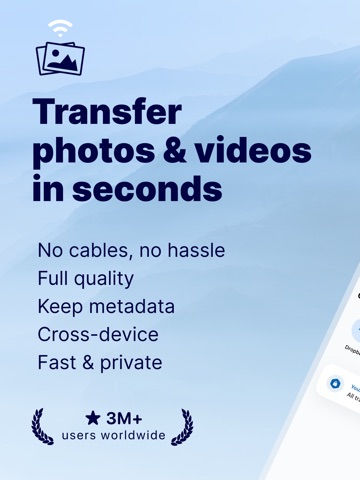
Photo Transfer allows you to easily send and share photos and videos through your WiFi. Make a backup of your photos and videos quickly and move your files from other mobile devices to iOS, iPad or computer and vice versa.
With over 2,5M downloads, more than 9k reviews in the App Store coming from happy users and millions of photo transfers made, this app is an indispensable tool for your iOS device.
Photo Transfer enables easy wifi transfer to send photos and videos between devices. It also allows users to make a backup. Whether you're an experienced user or a novice, you'll find it easy to use.
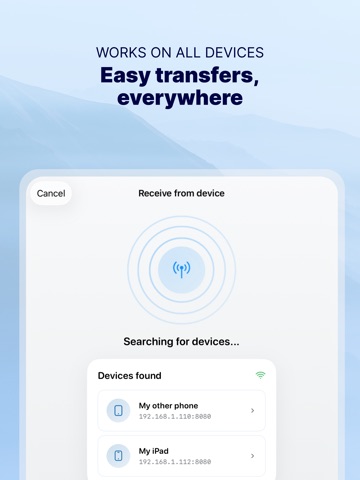
To send photos and videos, you will only need to have the app installed in both devices and a stable WiFi connection. You don’t need any cable!
▶ Main features:
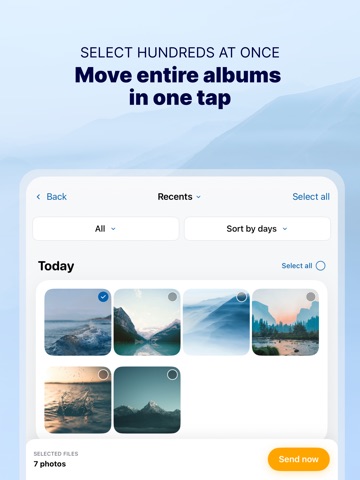
· Download multiple photos from your iPad, iPhone or iPod touch to your computer.
· Upload photos and videos from your computer to your iOS or other mobile devices.
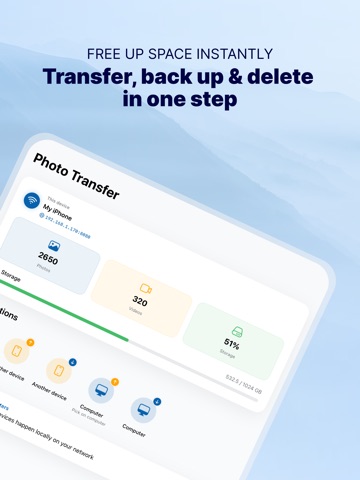
· Transfer and delete photos and videos stored on your iOS or other devices via WiFi.
· Transfer full-resolution photos and videos without losing quality and preserve files metadata in all transfer directions.
▶ More features you will love:
· Drag & drop photos from the app to any folder on your Mac and create new albums to upload photos.
· Use Photo Transfer with any web browser and preview your photos.
· Transfer your photos and videos directly from device to device using your local WiFi network. They are not stored in an external server and they never leave your local WiFi network, so your pictures will be safe!
· Use the USB cable to transfer photos between your Mac and your device when there is no access to a valid or stable WiFi signal.
· Pay only once when both devices use the same Apple account to purchase apps.
· Support to automatically convert HEIC files (High-Efficiency Image) to JPG when transferring from iPhone to any device or cloud service that we support.
With Photo Transfer you can transfer photos and videos from:
◉ Mobile device to iPhone:
· Transfer photos and videos from mobile device to iOS via wifi.
◉ iOS to another device:
· Move your photos and videos from your gallery to any mobile device.
· Send photos from an iPhone or iPad to your mobile device (photos and videos are saved on the default folder of Photo Transfer, but you can set your own album Gallery as destination).
◉ Any device or iOS to a computer (and vice versa):
· Use the wifi transfer feature to share photos and videos between Windows or Mac and Iphone, iPad, or another mobile device. You can also use the desktop app while transferring to Windows or MAC, or use the web browser as an alternative.
· Upload photos from your computer to your device.
Some requirements for using Photo Transfer:
· Access to a stable wifi network
· Public or private WiFi networks usually block communication between devices preventing the transfer connection.
· The app should be installed and opened on your devices when you transfer files.
Subscriptions:
► If you choose to purchase the PRO Upgrade subscription for 1 year, payment will be charged to your Apple account, and your account will be charged for renewal 24 hours before the end of the current period.
► Auto-renewal may be turned off at any time by going to your Apple ID settings after purchase.
► Any unused portion of a free trial period, if offered, will be forfeited when the user purchases a subscription to that publication, where applicable.
Privacy Policy: phototransferapp.com/privacy/app/
Terms of Service: phototransferapp.com/terms/app/
IMPORTANT: Free version allows you to transfer up to 5 photos in full resolution. Upgrade to PRO version and transfer more photos and videos at once! If you have any issue, visit phototransferapp.com or contact us at: support@phototransferapp.com
Download Photo Transfer to send and share photos, pictures, images and videos via wifi transfer.
--
Photo Transfer: Send via WiFi van Mobileware Studio SL is een app voor iPhone, iPad en iPod touch met iOS versie 17.6 of hoger, geschikt bevonden voor gebruikers met leeftijden vanaf 4 jaar.
Informatie voor Photo Transfer: Send via WiFiis het laatst vergeleken op 26 Oct om 20:26.


Informatie
- Releasedatum:4 Apr 2010
- Bijgewerkt:29 Sep 2026
- Versie:10.5.0
- Compatibiliteit:Vereist iOS 17.6 of nieuwer. Compatibel met iPhone, iPad en iPod touch.
- Grootte:51.1 MB
- Leeftijd:4+ jaar
- Beoordeling:4.7 van 5
- Categorie:
Nieuw in versie 10.5.0
Send photos straight to your NAS, transfer over USB, and keep your Live Photos live.
- Network drives (PRO) - Connect your NAS over SMB or WebDAV once, then send or receive photos and videos in a tap.
- Transfer over USB - Use a cable with our Windows app, even without Wi-Fi.
- Live Photos stay live - Photos from iPhones and Android phones keep their motion.
- Ready for iOS 27 - Fixes a crash when other devices browse your photos.
Plus stability fixes and other improvements.
Prijsgeschiedenis
57 geschreven reviewsRecensies
Makes even your dog happy
MeerThis app is so good, it even makes your dog happy. And who doesn’t want their dog to be happy?
5door Joh*******28/02/2021Efficient to download / transfer
MeerGreat tool to WiFi or connected download / transfer photos from ie iPhone to MacBook. Selection max 200 at the time.
Unfortunately not an option to quickly delete the transferred photos after transferring.
Otherwise great and using this for many years5door Cmm******07/02/2021Eindelijk een transfer app die werkt
MeerHeerlijk makkelijk programma die precies doet wat je wilt. Zowel met WiFi als bekabeld te gebruiken. Ik gebruik hem om albums met foto’s van de iPhone naar de laptop te verplaatsen en ik heb nog geen beter programma gevonden. Vandaag een upgrade gedaan. Houd wel je iPhone en Windows geüpdatet.
5door Von*******10/04/2020
Meer van Mobileware Studio SL

Reageer op deze app
Dit vind je misschien ook leuk
Laatste reacties
- Jolanda Smit zei over pym. Je fotoboek, al klaar: "Sinds 2013 al een gebruiker en sindsdien (zo goed als) elke..."
- Ludo zei over HERE WeGo Kaarten & Navigatie: "Op de iPhone is HereWeGo een goede navigatie app, echter met..."
- Soundmaster zei over UNDOK: "UNDOK werkt niet meer na installatie iOS27! Alle richtlijnen..."
- Ryan zei over James-Horeca: "Zeer teleurstellende ervaring Helaas heb ik een erg negatieve..."
- Ro Rare zei over myOpel: "LoL dat een company als Opel zo'n slecht functionerende..."
- Jo zei over Word Domination: "Leuke ap enkel wel heel jammer als je een nieuwe booster wilt..."
- Marc Van Hoey zei over Belfius Mobile: "beste, iPadgebruik, na laatste update, app. belfius mobile,..."
- Sanne zei over GoWish: "Ik heb deze eerst gebruikt, maar toch wel erg Amerikaans.. Ik..."
- Frederik Visser zei over Talkie: Tekst naar Spraak: "Ik ben op zoek naar ervaringen van gebruikers van de pro..."