
LET OP: Downloads verlopen via de App Store, bekijk daar altijd de meest actuele prijs, compatibiliteit en andere informatie. Je hebt een actief Apple account nodig om apps te installeren.
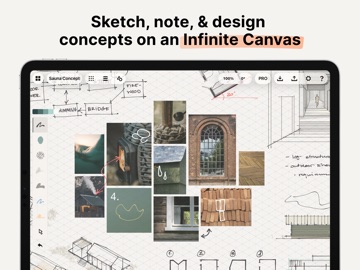
Think, plan & create – Concepts is a flexible vector-based sketchbook where you can take your ideas from concept to reality.
Concepts reimagines the ideation process – offering a safe and dynamic workspace to iterate and explore your ideas, organize your thoughts, and experiment with designs.
With our infinite canvas, you can:
• Sketch plans and whiteboard ideas
• Make notes, doodles, and mindmaps
• Draw storyboards, product sketches and designs
Concepts is vector-based, making every stroke editable and scalable. With our Nudge, Slice and Select tools, you can easily change any element of your sketch without redrawing it.
Talented creators at Disney, Playstation, Philips, HP, Apple, Google, Unity and Illumination Entertainment use Concepts to develop and realize extraordinary ideas. Join us!
Concepts has:
• An infinite canvas with optional paper types and grids
• Realistic pens, pencils and brushes that flow with pressure, tilt and velocity or create your own
• A tool wheel or bar you can personalize
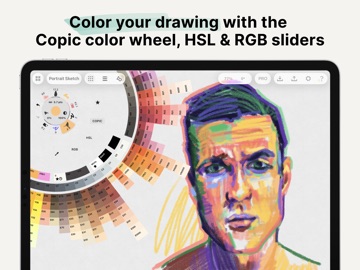
• HSL, RGB and COPIC color wheels
• Editable vector-based sketching – move, organize and edit the tool, color, size, scale, smoothing, opacity; transform or nudge lines to shape them
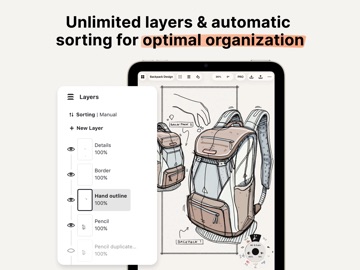
• Unlimited layers
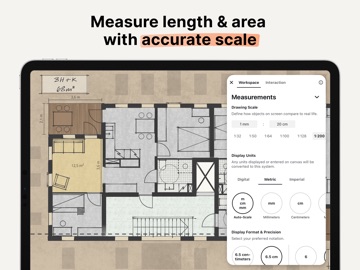
• Scale and measurement tools that calculate real-world dimensions
With Concepts, you can:
• Drag + drop images + PDF files
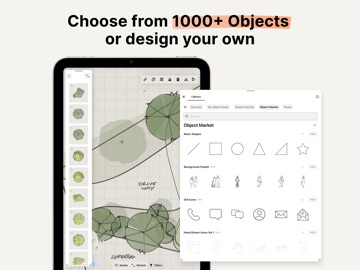
• Create, store and share vector Object libraries
• Export images, vector SVG + PDFs to scale for printing or efficient flow between apps (including Procreate, Sketchbook, AutoCAD and Adobe)
• Share directly to email, text, Files, cloud, photos, or your favorite social apps and present with AirPlay or a second screen
• Store your work safely in your personal iCloud Drive
FREE FEATURES
• Infinite canvas
• A selection of paper, grid types & tools to get you started
• The full COPIC color spectrum, RGB and HSL color wheels
• Five layers
• Unlimited drawings
• JPG exports
PAID FEATURES
Subscription:
• 200+ brush and Object libraries, features, and services
• Enjoy Team Sharing for smooth collaboration, including live-sharing of object libraries, color palettes & brushes, with new updates arriving all the time
• Unlocks everything across platforms
• TRY PREMIUM FREE FOR 7 DAYS
One-time-purchases:
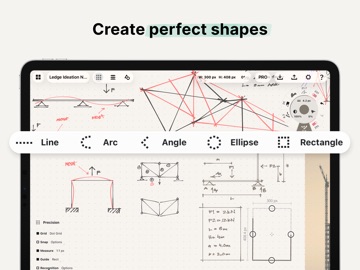
• Buy the Essentials for life and unlock selection & editing tools, infinite layers, shape guides, custom brushes, custom grids, and exports to PNG / PSD / SVG / DXF.
• Pay for advanced features as you need them – object packs & professional brushes are sold separately
• Limited to the platform you purchase on
Terms & Conditions:
• Monthly and yearly subscription payments are charged to your iTunes account at the time of purchase.
• Your plan will renew automatically at the end of the billing period unless canceled 24 hours before the billing period ends.
• You can cancel or make changes to your subscription at any time in your iTunes Account settings.
• Unused portions of any free trial period are forfeited if you make changes to your subscription.
We’re dedicated to quality and update frequently based on your feedback. Your experience matters to us. Chat with us in-app via Ask Us Anything, email us at concepts@tophatch.com, or find us anywhere with @ConceptsApp.
COPIC is the trademark of Too Corporation. Many thanks to Lasse Pekkala and Osama Elfar for the cover art!
--
Concepts van TopHatch, Inc. is een app voor iPhone, iPad en iPod touch met iOS versie 15.0 of hoger, geschikt bevonden voor gebruikers met leeftijden vanaf 4 jaar.
Informatie voor Conceptsis het laatst vergeleken op 5 Oct om 08:36.




Informatie
- Releasedatum:6 Oct 2012
- Bijgewerkt:30 Sep 2026
- Versie:6.36
- Compatibiliteit:Vereist iOS 15.0 of nieuwer. Compatibel met iPhone, iPad en iPod touch.
- Grootte:280 MB
- Leeftijd:4+ jaar
- Beoordeling:4.6 van 5
- Categorie:
Nieuw in versie 6.36
6.36 - Image Playground & Stability
Bring your ideas to life with Apple’s Image Playground! Effortlessly generate images and drop them straight onto your canvas on iOS 27 and later - find it under the Import menu. We’ve also introduced new toggles for canvas rotation and zoom snapping, along with stability enhancements to keep your creative flow seamless.
Read more at https://concepts.app/ios/roadmap. If you appreciate what we're doing, send us feedback or leave a review!
64 geschreven reviewsRecensies
Please add video, gif and audio support
MeerThis app has quite some capabilities but for what I need I really need to be able to add videos and gifs so I can layout some animated choreography.
3door Meg*****26/02/2026Can’t edit without paying
MeerRemember when you could use the eraser tool in MS Paint for free? Well apparently these guys can’t. Selecting things and ‘editing’ them is locking behind a 45,- bucks ‘Pro Tools’ package, or a 6,- a month subscription. Just pass this app and try another.
2door Mat*******18/04/2025Coolest Pencil app out there!
MeerTruly genius UI design and best in class drawing engine. Must have for anyone with an Apple Pencil
5door Piz*******03/06/2024
Reageer op deze app
Dit vind je misschien ook leuk

Laatste reacties
- Ryan zei over James-Horeca: "Zeer teleurstellende ervaring Helaas heb ik een erg negatieve..."
- Ro Rare zei over myOpel: "LoL dat een company als Opel zo'n slecht functionerende..."
- Jo zei over Word Domination: "Leuke ap enkel wel heel jammer als je een nieuwe booster wilt..."
- Marc Van Hoey zei over Belfius Mobile: "beste, iPadgebruik, na laatste update, app. belfius mobile,..."
- Sanne zei over GoWish: "Ik heb deze eerst gebruikt, maar toch wel erg Amerikaans.. Ik..."
- Frederik Visser zei over Talkie: Tekst naar Spraak: "Ik ben op zoek naar ervaringen van gebruikers van de pro..."
- Frederik Visser zei over Talkie: Tekst naar Spraak: "Ik ben op zoek naar ervaringen van gebruikers van de pro..."
- Mario van Gool zei over Vue NL: "1 groot drama. Account van mijn zoon niet meer in te loggen...."
- Thijs zei over Burgernet: "Bij het openen van de app komt het bericht ""Er is iets..."