
LET OP: Aankopen verlopen via de App Store, bekijk daar altijd de meest actuele prijs, compatibiliteit en andere informatie. Je hebt een actief Apple account nodig om apps te installeren.
Get your party started using your Philips Hue lights. Watch your lights pulse and flash to your favorite songs.*
*Hue Bridge or Hue Bridge Pro required
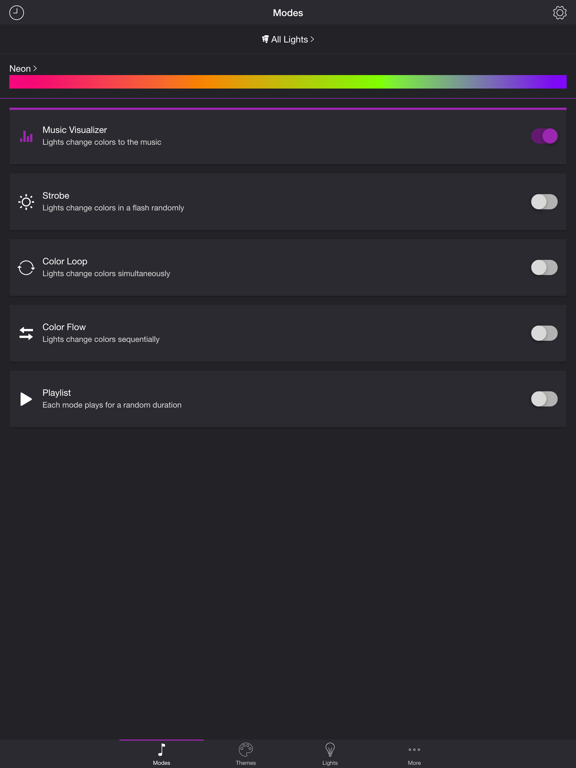
MODES
• Music Visualizer — Lights change colors to the music (Microphone access required)
• Strobe — Lights change colors in a flash randomly
• Color Loop — Lights change colors simultaneously
• Color Flow — Lights change colors sequentially
• Playlist — Each mode plays for a random duration
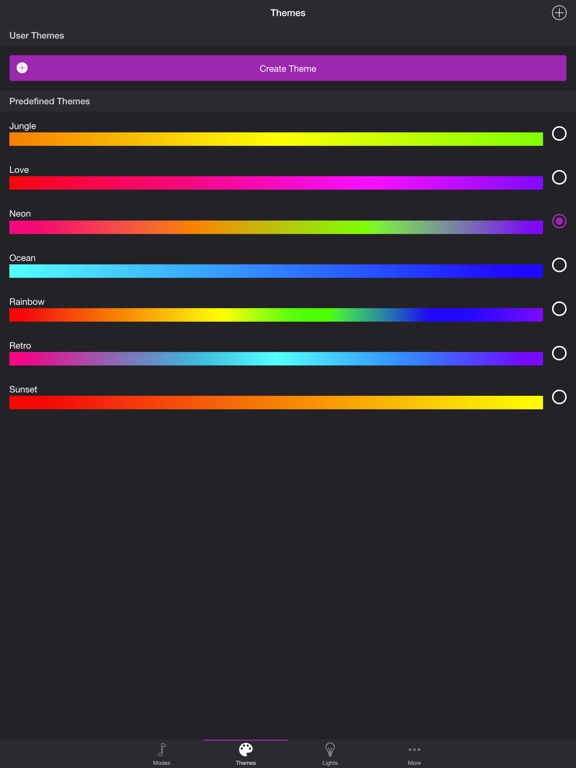
THEMES
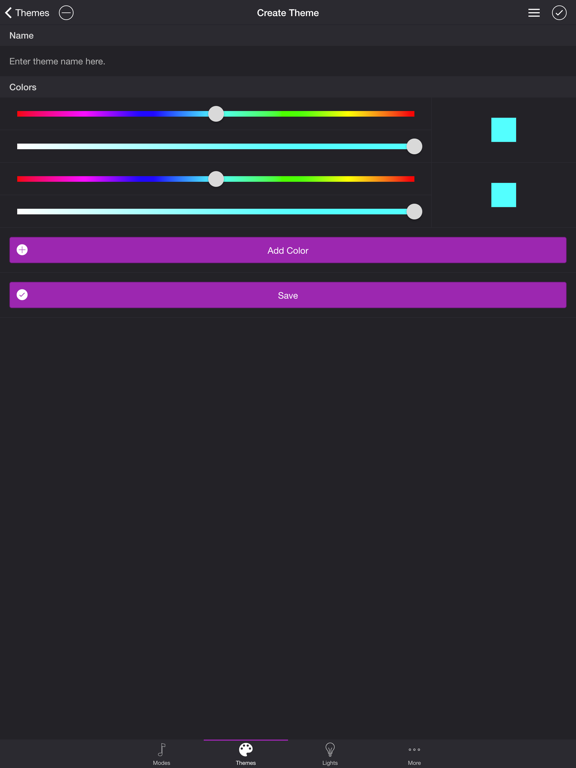
Choose from one of the predefined themes or create your own on the Themes tab. Each mode uses the colors in the selected theme. To edit a user theme in the list, swipe the item to the left and tap the pencil icon. You can reorder colors for the Color Loop mode.
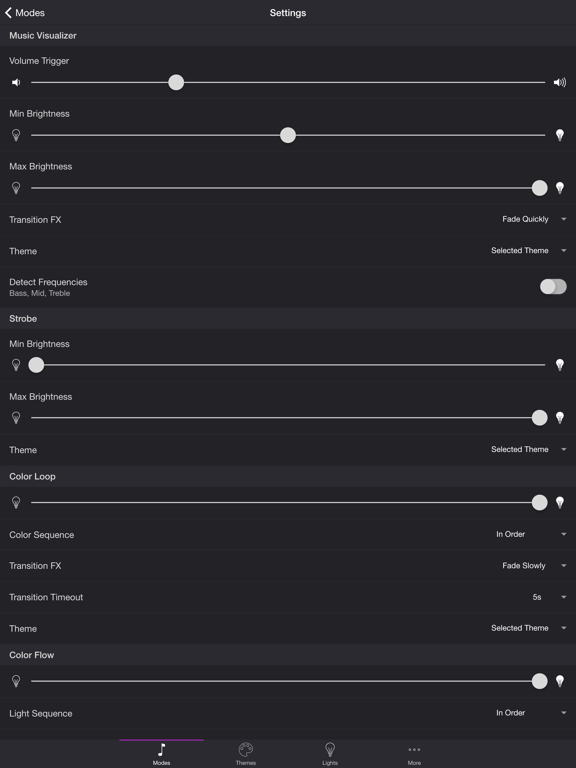
SETTINGS
Music Visualizer
• Change volume trigger for light effects
• Change minimum brightness of lights when inactive
• Change maximum brightness of light effects
• Change transition effects: Random, Pulse, Fade Quickly, Fade Slowly
• Change theme
• Toggle detect frequencies (Bass, Mid, Treble)
Bass, Mid, Treble (Music Visualizer)
• Toggle light effects
• Target lights for effects
• Change transition effects: Random, Pulse, Fade Quickly, Fade Slowly
• Change theme
• Change frequency range trigger
Strobe
• Change minimum brightness of lights when inactive
• Change maximum brightness of light effects
• Change theme
Color Loop, Color Flow
• Change brightness of lights
• Change color or light sequence: In Order, Reverse Order, Random Order
• Change transition effects: Random, Pulse, Fade Quickly, Fade Slowly
• Change transition timeout
• Change theme
Playlist
• Change sequence: In Order, Reverse Order, Random Order
• Change order
• Toggle modes
• Change duration range for each mode
General
• Change default end state: Revert, Off
• Change sleep end state: Revert, Off
• Select mode to automatically start when app opens
• Choose time to automatically stop selected mode
LIGHTS / GROUPS
Select one or more lights for your light show on the Lights tab. Choose a group that you set up using the Philips Hue app, or create a new zone in the Soundstorm for Hue app. To edit a room or zone in the list, swipe the item to the left and tap the pencil icon. You can reorder lights for the Color Flow mode. When you add, remove, or change lights, pull down the list to refresh.
ADDITIONAL FEATURES
• Sleep Timer — Choose the state of your lights after the timer ends with the Sleep End State setting.
Please contact me at support@soundstorm.scottdodson.dev if you experience any issues. I'd love to hear your thoughts and appreciate you taking the time to rate and review the app. I want to continue to improve Soundstorm for Hue and create a great experience for you and future users. Thank you! —Scott
--
Soundstorm for Hue van Scott Dodson is een app voor iPhone, iPad en iPod touch met iOS versie 13.0.0 of hoger, geschikt bevonden voor gebruikers met leeftijden vanaf 4 jaar.
Informatie voor Soundstorm for Hueis het laatst vergeleken op 20 Aug om 00:46.


Informatie
- Releasedatum:27 Apr 2017
- Bijgewerkt:12 May 2026
- Versie:4.3.2
- Compatibiliteit:Vereist iOS 13.0.0 of nieuwer. Compatibel met iPhone, iPad en iPod touch.
- Grootte:19.8 MB
- Leeftijd:4+ jaar
- Beoordeling:3 van 5
- Categorie:
Nieuw in versie 4.3.2
Need help? Email support@soundstorm.scottdodson.dev
- fixed compatibility issue
Prijsgeschiedenis
Meer van Scott Dodson

Reageer op deze app
Dit vind je misschien ook leuk
Laatste reacties
- Marc Van Hoey zei over Belfius Mobile: "beste, iPadgebruik, na laatste update, app. belfius mobile,..."
- Sanne zei over GoWish: "Ik heb deze eerst gebruikt, maar toch wel erg Amerikaans.. Ik..."
- Frederik Visser zei over Tekst naar spraak - Talkie: "Ik ben op zoek naar ervaringen van gebruikers van de pro..."
- Frederik Visser zei over Tekst naar spraak - Talkie: "Ik ben op zoek naar ervaringen van gebruikers van de pro..."
- Mario van Gool zei over Vue NL: "1 groot drama. Account van mijn zoon niet meer in te loggen...."
- Thijs zei over Burgernet: "Bij het openen van de app komt het bericht ""Er is iets..."
- Barry zei over Klaverjas: "Ik speel met vrienden tegenwoordig op de app ‘Klaverjas..."
- Catharina zei over DVHN - Nieuws & Digitale Krant: "Ik mis het nieuwswoord. Kunnen jullie dit weer toevoegen? Het..."
- sara zei over FarmVille 2: Het boerenleven: "Maanden ben ik al in contact met Zynga over valsspelers bij de..."