
LET OP: Downloads verlopen via de App Store, bekijk daar altijd de meest actuele prijs, compatibiliteit en andere informatie. Je hebt een actief Apple account nodig om apps te installeren.
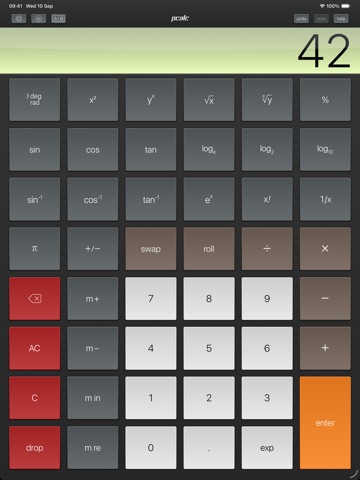
PCalc is the powerful choice for scientists, engineers, students, programmers, or indeed anybody looking for a feature rich calculator. It includes an optional RPN mode and multi-line display, a choice of button layouts, an extensive set of unit conversions and constants, a paper tape, multiple undo and redo, engineering and scientific notation, as well as support for hexadecimal, octal, and binary calculations.PCalc Lite is a fully functional and free taste of our very popular scientific calculator. It includes an optional RPN mode, multiple undo and redo, unit conversions and constants, as well as two stylish themes and our highly praised design. A great choice for your new iPad!
If you like what you see, the full version has many more settings and themes, a paper tape, engineering and scientific notation, and full support for hexadecimal, octal, and binary calculations. You can also now purchase extra features directly from inside PCalc Lite. Buy them individually, or buy everything.
Includes an Apple Watch app, so you can calculate on your wrist!
--
PCalc Lite van TLA Systems Ltd. is een app voor iPhone, iPad en iPod touch met iOS versie 15.0 of hoger, geschikt bevonden voor gebruikers met leeftijden vanaf 4 jaar.
Informatie voor PCalc Liteis het laatst vergeleken op 27 Sep om 22:27.



Informatie
- Releasedatum:19 Dec 2008
- Bijgewerkt:12 Mar 2026
- Versie:3.14.4
- Compatibiliteit:Vereist iOS 15.0 of nieuwer. Compatibel met iPhone, iPad en iPod touch.
- Grootte:80.0 MB
- Leeftijd:4+ jaar
- Beoordeling:3.2 van 5
- Features:Game Center
- Categorie:
Nieuw in versie 3.14.4
Menus are more consistent with the macOS version.
Fixed a problem speaking negative numbers.
Fixed a problem displaying overflows.
With the "Power User Pack" installed:
Added an option to use woodworking fractions, in the Advanced settings.
Added an option to use the Indian numbering system for thousands separators, in the Advanced settings.
Added an option to ignore trailing operators, on by default, in the Advanced settings.
Added an option to automatically press Equals before "M+" and "M in" operations, on by default, in the Advanced settings.
The "Clear on Open" option will now only trigger if you haven't used PCalc in the last five minutes.
With the "Theme Pack" installed:
Added an option to allow all themes for dark or light mode, in the Theme settings.
Added an option to hide any gloss effects on the display, in the Theme settings.
The user interface mode setting is now independent of the theme mode setting.
Fixed a problem with the user interface dark mode settings.
With the "Conversion Pack" installed:
Added "Flow Rate", "Jewelry", and "Typography" sections to the conversions.
Added "tau" to the constants.
You can now use combinations and permutations in user functions and conversions.
Now show a preview image when picking an SF Symbol.
With the "Engineer Pack" or "Programmer Pack" installed:
Added "norm", "sci", "eng", "acc", "frac", "nCr", "nPr", and "tau" buttons to the layout editor.
Added "tau" as a 2nd function of "pi" in most layouts.
Improved the layout editor with all the commands and keyboard shortcuts from the macOS version.
You can now edit buttons to display any SF Symbol as an image.
6 geschreven reviewsRecensies
Good app, but startup is slow.
MeerThis is an absolutely fabulous calculator app. I use it in RPN mode and I love it. My calculator used to be an HP 48G, but I switched to this for the quick stuff, as I was using my pc for the complexer things anyway.
There is one gripe I have, and that is the slow startup since some months now (don't know which version it started). I mean, I have this app for the quick stuff, but when it takes 20 seconds to start up, it's not quick anymore, is it?
Opening the app when it was recently used is quick though, but it's still annoying.3door Bas**10/12/2016Impressive!
MeerMexxter: press the info/help button, then in app store, then look for lost purchases.Restored at no cost. It's really all there.
PCalc Lite is a calculator that makes me wish it had been available back when I needed the use of calculators all the time. It makes me wish that I had more calculations to work on nowadays.
Especially after adding all the optional expansion packs (don't know if that makes it equal to PCalc, the descriptions don't say), PCalc Lite has become the only calculator app for me on my iPad.
My last wish would be for a programmable pack, which adds a mode where one could enter long sequences of operations (and even save them somewhere, to reload and reuse later), and have them repeatedly be performed automatically with changing input values... Oh... Please, forgive this dreamer; sometimes he's not realistic. PCalc Lite is the best!5door Nob*******14/09/2013Nice calc, just 1! con
MeerVer nice calc, it can be matched with a non free calc. But there is one thing to improve. There should be one extra row to see what is bin typed. This can actually also be done in the same. Hope to see this improvent soon.
4door Chi*****16/10/2012
Meer van TLA Systems Ltd.

Reageer op deze app
Dit vind je misschien ook leuk
Laatste reacties
- Robertsop zei over Contacts Sync Pro: "Hola, volia saber el seu preu."
- Ryan zei over James-Horeca: "Zeer teleurstellende ervaring Helaas heb ik een erg negatieve..."
- Adnan Ali zei over Pindat - Reisblog maken: "Поринути у світ захоплюючих подорожей, відкривати приховані..."
- plinko clicker game zei over Radio 10: "Is there actually any point to this app when you can just..."
- random number generator phone zei over Radio 10: "Ik zag dat de AppWereld-site de app niet meer heeft, klinkt..."
- Ro Rare zei over myOpel: "LoL dat een company als Opel zo'n slecht functionerende..."
- Jo zei over Word Domination: "Leuke ap enkel wel heel jammer als je een nieuwe booster wilt..."
- Marc Van Hoey zei over Belfius Mobile: "beste, iPadgebruik, na laatste update, app. belfius mobile,..."
- Sanne zei over GoWish: "Ik heb deze eerst gebruikt, maar toch wel erg Amerikaans.. Ik..."