
LET OP: Downloads verlopen via de App Store, bekijk daar altijd de meest actuele prijs, compatibiliteit en andere informatie. Je hebt een actief Apple account nodig om apps te installeren.
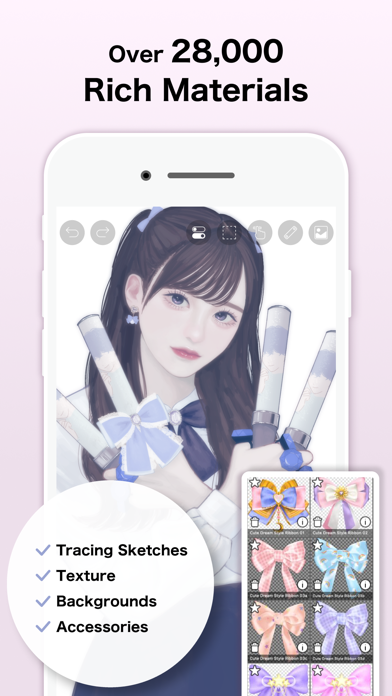
ibis Paint X is een populaire en veelzijdige teken-app die in totaal meer dan 500 miljoen keer als serie is gedownload, met meer dan 47000 penselen, meer dan 27000 materialen, meer dan 2100 lettertypen, 84 filters, 46 schermtonen, 27 overvloeimodi, opname van tekenprocessen, penseelstreken stabilisatiefunctie, verschillende liniaalfuncties zoals radiale lijnlinialen of symmetrielinialen en knipmaskerfuncties.
*YouTube-kanaal
Veel tutorial Video's op ibis Paint worden geüpload naar onze YouTube-kanaal.
Abonneren!
https://youtube.com/ibisPaint
*Concept/functies
- Een zeer functionele en professionele functies overtreffen die van Desktop-tekening apps.
- Soepele en comfortabele tekening ervaring gerealiseerd door OpenGL-technologie.
- Opname van uw tekening proces als een video.
- SNS functie waar je leren tekenen technieken van andere gebruikers tekening proces Video's.
*Feedback van gebruikers
Wij ontvangen vele goede reputaties van gebruikers.
- Ik had nooit kunnen veronderstellen dat ik zo'n mooie tekeningen op smartphones kan tekenen!
- Gemakkelijkst te gebruiken onder alle tekening apps!
- Ik heb geleerd hoe je digitale tekeningen te trekken zonder Mac of PC!
*Functies
ibis Paint heeft hoge functionaliteit als tekening app samen met eigenschappen van het delen van teken processen met andere gebruikers.
[Penseel functies]
- Gladde tekening op tot 120 fps.
- Meer dan 47.000 soorten borstels met inbegrip van DIP pennen, viltstiften, digitale pennen, lucht borstels, ventilator borstels, platte borstels, potloden, olie borstels, houtskool borstels, krijt en postzegels.
[Eigenschappen lagen]
- U kunt zoveel lagen toevoegen als u nodig hebt, zonder limiet.
- Lagenparameters die op elke laag afzonderlijk kunnen worden ingesteld, zoals laagdekking, alfa-menging, optellen, aftrekken en vermenigvuldigen.
- Een handige clipping-functie voor het clippen van afbeeldingen, enz.
*Over ibis Paint aankoopplan
De volgende aankoopplannen zijn beschikbaar voor ibis Paint:
- ibis Paint X (de gratis versie)
- ibis Paint (de betaalde versie)
- Advertentieverwijdering-upgrade
- Premium Lidmaatschap (Maandabonnement / Jaarabonnement)
Er is geen verschil in functies, behalve de aan- of afwezigheid van advertenties voor de betaalde versie en de gratis versie.
Als u de Advertentieverwijdering-upgrade aanschaft, worden de advertenties niet weergegeven en is er geen verschil met de betaalde versie van ibis Paint.
Voor het gebruik van meer geavanceerde functies zijn de volgende Premium Lidmaatschap (Maandabonnement / Jaarabonnement) contracten vereist.
[Premium Lidmaatschap]
Een Premium lid kan de Premium functies gebruiken. Alleen voor de eerste keer is een gratis proefperiode van 7 dagen of 1 maand beschikbaar. Het Premium lidmaatschap geeft recht op de volgende functies.
- 20 GB aan cloud opslag capaciteit
- Premium-materialen
- Premium-Canvaspapieren
- Premium-lettertypes
- Tone curve filter
- Gradatie kaart filter
- Niveaus Aanpassings filter
- Vector-tool(*1)
- Premium-aanpassingslagen
- Omringende vulling・Omringende gum
- AI-verstoring
- Kunstwerkenmapfunctie
- Originele penseelpatronen importeren
- Achtergrondkleur van canvas aanpassen
- Watermerk verwijderen van video's
- Geen reclames op de schermen
- Plus vele andere functies die exclusief zijn voor Premium lidmaatschap!
(*1) Je kunt het tot 1 uur per dag gratis uitproberen.
* Nadat je een Premium Lidmaatschap met een gratis proefperiode bent geworden, worden automatisch verlengingskosten in rekening gebracht, tenzij je je Premium Lidmaatschap ten minste 24 uur voor het einde van de gratis proefperiode opzegt.
* We zullen toevoegen Premium features in de toekomst, kijk uit voor hen.
*Vragen en ondersteuning
Vragen en bug reports in Reviews zullen niet beantwoord worden, dus neem contact op met ibis Paint support.
https://ssl.ibis.ne.jp/en/support/Entry?svid=25
*Algemene voorwaarden van ibisPaint
https://ibispaint.com/agreement.jsp
--
ibis Paint X van ibis inc. is een app voor iPhone, iPad en iPod touch met iOS versie 15.0 of hoger, geschikt bevonden voor gebruikers met leeftijden vanaf 12 jaar.
Informatie voor ibis Paint Xis het laatst vergeleken op 13 Apr om 11:07.




Informatie
- Releasedatum:1 Aug 2011
- Bijgewerkt:12 Apr 2026
- Versie:14.0.1
- Compatibiliteit:Vereist iOS 15.0 of nieuwer. Compatibel met iPhone, iPad en iPod touch.
- Grootte:118 MB
- Leeftijd:12+ jaar
- Beoordeling:4.6 van 5
- Categorie:
Soms/Mild realistisch geweld;
Soms/Mild animatiegeweld of fictief geweld;
Soms/Milde horror-/angstthema’s.
Nieuw in versie 14.0.1
Thank you for using ibisPaint X!
The summary of this update is as follows.
[Fixed Bugs and Problems]
- Fixed a crash that could occur when clearing a layer.
- Fixed a crash that occurred when using the "Lasso Selection" feature to the Vector tool, Text tool, and Frame Divider tool while a window close animation was playing.
- Fixed an issue where the app could crash when image saving completed.
- Fixed an issue where the app could crash during color palette merging, renaming, or color palette QR code importing.
- Fixed a bug where the app could crash when deleting an artwork in My Gallery.
- Fixed an issue where the app became unresponsive after closing the paywall at startup.
- Fixed a bug where the app could crash when using the “Parallel Gradation", “Concentric Gradation” or “Radial Line Gradation”.
[New Features in ver. 14.0.0]
- You can now create and name multiple color palettes for easier management.
- Added a feature to share color palettes via QR code.
- Brushes in the "Basic" tab of the Brush window are now organized by category.
- Added support for selecting CMYK colors when saving artwork as a JPEG or flattened layer PSD file.
- Added support for selecting grayscale (8bit) color space when saving artwork as a PNG or JPEG file.
- Added support for selecting binary (1bit) color space when saving artwork as an opaque PNG file.
- Added "Speech Bubble" to the Shape tool.
- Added "Thin Arrow" to the Shape tool.
- You can now adjust the position, shape, and other properties of a shape before finalizing it in the Shape tool.
- Added an "Anti-aliasing" option available when "Fill" is enabled in the Shape Tool. When turned on, it smooths the edges of the filled area.
- Added "Draw Line by Brush" to the Shape tool settings.
- Added new special pens: “Parallel Gradation Pen” and “Concentric Gradation Pen”.
- Added knobs to move the start and end points of the gradation in “Parallel Gradation” and "Concentric Gradation".
- Added "Transparent-Current Color" to preset of gradation slider.
- Added new parameter “Extension Method” to “Parallel Gradation” and "Concentric Gradation”.
- For iPad, added the floating view of the Color window.
- Added a graph to the "Dynamic" tab of each brush setting to customize the response of size and opacity to pen pressure.
- Added a Brush Lock feature. You can access it via the lock icon located in the top-right corner of each brush's settings screen.
- Added the Brush Cursor feature. When using a stylus with hover support, you can now display the brush pattern on the screen while hovering. To enable this, go to the "Stylus" section in the Settings window and select "Brush Pattern" under "Brush Cursor while Hovering."
- Added "Lasso Selection" feature to the Vector tool, Text tool, and Frame Divider tool.
- Some filters in the "Art," "Pixelate," and "Transform" categories can now be used as adjustment layers.
- Significantly expanded keyboard shortcuts. Press "Shift + /" to view the list and customize assignments.
- Added a Layer Lock feature. You can toggle the lock via the menu accessed through the "⋮" button in the Layer window.
550 geschreven reviewsRecensies
Beste tekenapp ooit
MeerIk heb nog nooit zo een goede app gezien! Alle kleuren verschillende soorten en maten! Klein en groot. 5 sterren natuurlijk
5door Lov*******08/04/2026Amazing!
MeerWorks amazing even when using the free version. You can unlock the brushes just for a tiny add and you don’t get adds while drawing! Also has all the handy features you could think of to make ur artwork the prettiest piece you ever made.
5door Y0 *******06/04/2026WOW DIT IS ZO GOED
Meerik gebruik ook deze app voor digitale tekenen en deze app werkt ZO goed. Ik vindt het een hele goeie app omdat het heeft zoveel dingen voor tekenen.
5door M O******03/04/2026
Meer van ibis inc.

Reageer op deze app
Dit vind je misschien ook leuk
Laatste reacties
- Wim van Gastel zei over My BMW: "Sluit me aan bij eerdere reacties. Het percentage van de..."
- Paul Bergervoet zei over MYPEUGEOT APP: "In en intrieste app. Ook de ondersteuning via de..."
- Volspel49 zei over 1010! Block Puzzle Game: "1010! Werkt niet meer. Sluit automatisch, wat ik ooik doe!"
- Edith Windhouwer zei over Word Blitz ・: "Waardeloos dat als je wint met 1000 punten je 1 beker krijgt,..."
- Pieter Nieuwenhuis zei over Klaverjas HD: "Wij spelen regelmatig met 4 vrienden, verdeeld over Europa...."
- Bep vreeswijk zei over Oei, ik groei!: "Jammer,ik speelde het jaren lang voor koopprijs,eenmalig,was..."
- Bep vreeswijk zei over Oei, ik groei!: "Ik kocht het spel,was duur in vergelijking tot anderen en zou..."
- EBB zei over QuizzLand Algemene Kennis Quiz: "Terwijl ik midden in het spel zat en klikte was er plotseling..."
- Mary zei over Klaverjas: "Kan je met vrienden spelen of alleen maar met de computer?"