TimeFinder: Time Blocking
TimeFinder, LLC
LET OP: Downloads verlopen via de App Store, bekijk daar altijd de meest actuele prijs, compatibiliteit en andere informatie. Je hebt een actief Apple account nodig om apps te installeren.
Finally, a planner that works the way your brain does. 400,000+ people use TimeFinder to build flexible, color-coded plans that bend—not break—when life happens.
The #1 time blocking app on the App Store—refined over 8 years of user feedback. Whether you have ADHD, a packed schedule, or just a brain that resists plans, this is planning that finally clicks.
"This app allows me to brain dump all my tasks into a list and then decide each day which ones to slide into my schedule. It's reduced my stress because I frequently overfill my day. Now I can realistically see what I can do." — LynnProgrammer
SEE YOUR DAY. SHAPE YOUR DAY.
- Drag & Drop: Pull tasks from your lists into your schedule—or back again
- Flexible Time Blocks: Plan in 5, 10, 15, 30, or 60-minute chunks
- Color-Coded Clarity: Every task gets a color so your day makes sense at a glance
- Multiple Views: Day, week, month, and agenda—see your schedule your way
PLANS CHANGE. THAT'S THE POINT.
- Schedule Shift: Running late? Shift your tasks earlier or later with a single tap
- Task Rollover: Roll unfinished tasks into available time slots—nothing gets lost
- Task Bucket: Commit tasks to a date without locking them to a specific time
- Zero Friction: Stretch, shrink, and rearrange by dragging—no menus needed
"PRECISELY what I have been looking for, as if it were tailored for me! For ADHD persons—it is just so dang helpful!" — Summitmarlene
LISTS. SCHEDULE. FOCUS.
- Split View: See your lists and schedule side by side—drag between them
- Focus Mode: A guided timer that helps you work through your plan, task by task
- Apple Watch: See your upcoming schedule on your wrist with complications
- Subtasks: Break big tasks into steps and track progress as you go
SYNCS WITH YOUR LIFE
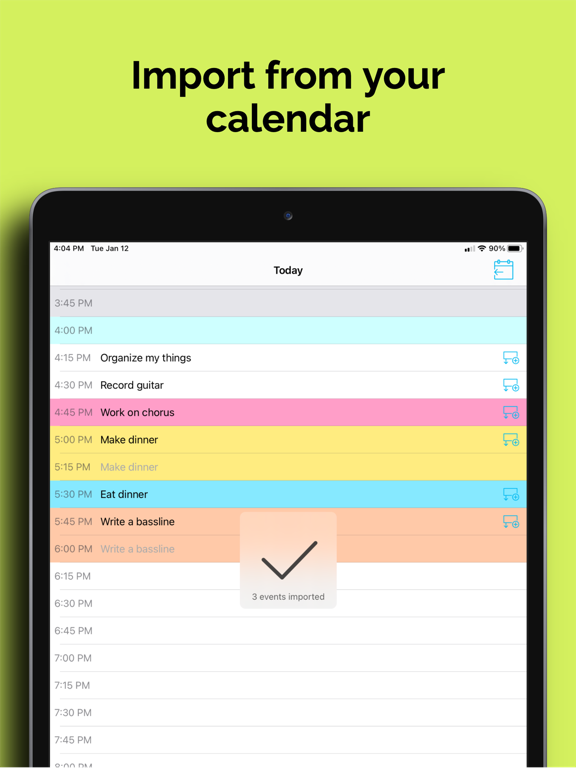
- Calendar Sync: Import events from Apple Calendar, Google, and Outlook—and export your TimeFinder schedule back
- Reminders Sync: Two-way sync with Apple Reminders—changes update in both apps
- Widgets: Home Screen, Lock Screen, and Live Activities
- iPhone, iPad, Mac & Apple Watch: Your schedule stays in sync across all your devices
"I 'touch' my todo items just once—to put them on a time block to execute. These tasks aren't 'living' with me anymore. They're actually getting done." — Kurt4i
MAKE IT YOURS
- Color Palettes: Choose from dozens of presets—or build your own in the Palette Editor
- Schedule Templates: Save your best routines and reapply them in one tap
- Custom Intervals: Break up your day however works for you
BUILT OVER 8 YEARS. SHAPED BY REAL USERS.
TimeFinder started as one developer's answer to his own ADHD and procrastination. 8 years and 400,000+ downloads later, it's still independently built and personally supported by its founder, Luke—no faceless corporation, no VC playbook. Every update reflects real feedback from real people.
- Direct support from the developer
- Share ideas at feedback.timefinder.app
- Regular updates driven by your feedback
Try TimeFinder free for 7 days and discover why so many say it's the planner they've been looking for.
Note: Some features require TimeFinder Premium.
--
TimeFinder: Time Blocking van TimeFinder, LLC is een app voor iPhone, iPad en iPod touch met iOS versie 15.0 of hoger, geschikt bevonden voor gebruikers met leeftijden vanaf 4 jaar.
Informatie voor TimeFinder: Time Blockingis het laatst vergeleken op 24 Mar om 23:20.




Informatie
- Releasedatum:3 Mar 2018
- Bijgewerkt:24 Mar 2026
- Versie:9.4.11
- Compatibiliteit:Vereist iOS 15.0 of nieuwer. Compatibel met iPhone, iPad en iPod touch.
- Grootte:158 MB
- Leeftijd:4+ jaar
- Beoordeling:4.4 van 5
- Categorie:
Nieuw in versie 9.4.11
Your most requested features are here! AI planning, system alarms, pinch-to-zoom, 500+ new icons, and more.
• AI Assistant
Plan your day and organize your lists in plain language.
• System Alarms
Reminders that sound even when your device is on silent. No more missed time blocks. Requires iOS 26+.
• Pinch to Zoom
Zoom out to see your full day's schedule at a glance; a long-requested feature from the Feedback Board!
• 500+ New Icons
Choose from 500+ icons across 17 categories, with auto-suggestions as you name your list.
• Bug Fixes & Improvements
Dozens of under-the-hood improvements for a faster, more stable experience.
Keep sharing your ideas at feedback.TimeFinder.app; your feedback shapes every update!
Thanks!
—Luke
9 geschreven reviewsRecensies
Great App
MeerLove the app but have a feature request; Would love to see the calendar sync work bidirectional
5door Dig*****09/10/2025Uitstekend
MeerEen mooie overzichtelijke app, enige nadeel: het gaat maar tot 21:30 en anders moet je betalen maar voor de rest een prima app
5door Onv*******02/01/2025Better after fixes
MeerI stopped using it after the redesign, but after the updates it has gotten way better. Only thing is, used to automatically change color if it has the same name as another block (for which you selected a color already). So if I make working out green for monday. I want to put it on tuesday as well it automatically changes to green instead of the default color.
4door Mzz31/08/2024
Reageer op deze app
Recent bekeken

Dit vind je misschien ook leuk
Laatste reacties
- Orlandofuh zei over Stickyboard 2: "variant5"
- kutgame zei over Geometry Dash Lite: "rare game met frustratie"
- kutgame zei over Geometry Dash Lite: "frustratie "
- Volspel49 zei over 1010! Block Puzzle Game: "1010! Werkt niet meer. Sluit automatisch, wat ik ooik doe!"
- Edith Windhouwer zei over Word Blitz ・: "Waardeloos dat als je wint met 1000 punten je 1 beker krijgt,..."
- Pieter Nieuwenhuis zei over Klaverjas HD: "Wij spelen regelmatig met 4 vrienden, verdeeld over Europa...."
- Bep vreeswijk zei over Oei, ik groei!: "Jammer,ik speelde het jaren lang voor koopprijs,eenmalig,was..."
- Bep vreeswijk zei over Oei, ik groei!: "Ik kocht het spel,was duur in vergelijking tot anderen en zou..."
- EBB zei over QuizzLand Algemene Kennis Quiz: "Terwijl ik midden in het spel zat en klikte was er plotseling..."