
LET OP: Aankopen verlopen via de App Store, bekijk daar altijd de meest actuele prijs, compatibiliteit en andere informatie. Je hebt een actief Apple account nodig om apps te installeren.
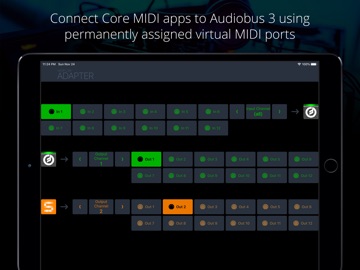
This MIDI app for Audiobus 3 allows you to include music apps, which don't support Audiobus MIDI but only Core MIDI. It creates permanent virtual MIDI ports for input and output. After distinctly selecting each of those ports in your "legacy" music apps, they can receive and send MIDI from/to Audiobus 3.
+ Connect up to 10 receiving apps (like synthesizers)
+ Connect up to 10 sending apps (like sequencers)
+ Use multiple instances of this app in Audiobus
NOTE: This app requires Audiobus 3. Insert it into one or more MIDI input and output ports. Furthermore, this adapter only works with apps that allow you to select MIDI ports for sending and receiving. It won't work with apps that have no MIDI setup page.
IMPORTANT: Connecting apps via Core MIDI is an advanced topic. If you haven't done it before, please become familiar with it prior to downloading this app.
CONNECT YOUR "LEGACY" APPS TO AUDIOBUS 3
Audiobus 3 has introduced a powerful MIDI routing system that makes interconnecting MIDI apps a lot easier than it was before. However, not all music apps support this new system, yet. Midiflow Adapter makes those apps compatible, by translating between the "old" Core MIDI system and the new Audiobus 3. This, however, only works with apps that let you to select MIDI ports for input and output, or at least the MIDI channel. It is not enough if these apps create their own virtual MIDI port.
SETUP FOR SYNTH APPS (RECEIVERS)
Midiflow Adapter creates 10 permanent virtual MIDI output ports. This means that you can use up to 10 music apps with this adapter. For setting it up, start Midiflow Adapter. Then, start your first synth app that you want to connect with Audiobus via this adapter app. Go to its MIDI settings and activate reception on the MIDI port called "MF Adapter Out 1". It is essential that you deactivate reception on all other ports. Now, go to Audiobus 3 and insert MF Adapter into a MIDI output slot. In the input slot, add any other app, like Midiflow Keyboard. When you switch to Midiflow Adapter, you can select which of your synth apps the MIDI data should go. In this case, it is already set to "Out 1", so you're ready to go.
For your second synth app, do the same steps, but select MIDI port "MF Adapter Out 2", and so on. Then, you can select it in the adapter app.
SETUP FOR SEQUENCER APPS (SENDERS)
The procedure is identical to the one for receiver apps (see above). However, you need to configure the MIDI output settings instead of the input settings. Midiflow Adapter creates 10 permanent virtual MIDI input ports for that purpose. They are called "MF Adapter In 1-10".
WORKING WITH CHANNELS
Some Core MIDI apps don't allow you to select the input/output ports, but only the MIDI input/output channel. In that case, they receive on all ports. The only way to selectively trigger them is to assign a unique channel to them. In Midiflow Adapter, you can then select this channel as input/output.
NON-COMPATIBLE APPS
If one of your music apps neither supports selecting the MIDI port nor setting the MIDI channel, you cannot use it with Midiflow Adapter.
--
Midiflow Adapter (Audiobus) van Johannes Doerr is een app voor iPhone, iPad en iPod touch met iOS versie 10.2 of hoger, geschikt bevonden voor gebruikers met leeftijden vanaf 4 jaar.
Informatie voor Midiflow Adapter (Audiobus)is het laatst vergeleken op 26 Sep om 11:26.

Informatie
- Releasedatum:20 Apr 2017
- Bijgewerkt:7 May 2024
- Versie:1.0.5
- Compatibiliteit:Vereist iOS 10.2 of nieuwer. Compatibel met iPhone, iPad en iPod touch.
- Grootte:4.81 MB
- Leeftijd:4+ jaar
- Beoordeling:5 van 5
- Categorie:
Nieuw in versie 1.0.5
Compatibility improvements for recent iOS versions
Prijsgeschiedenis
Meer van Johannes Doerr

Reageer op deze app
Dit vind je misschien ook leuk
Laatste reacties
- Robertsop zei over Contacts Sync Pro: "Hola, volia saber el seu preu."
- Ryan zei over James-Horeca: "Zeer teleurstellende ervaring Helaas heb ik een erg negatieve..."
- Adnan Ali zei over Pindat - Reisblog maken: "Поринути у світ захоплюючих подорожей, відкривати приховані..."
- plinko clicker game zei over Radio 10: "Is there actually any point to this app when you can just..."
- random number generator phone zei over Radio 10: "Ik zag dat de AppWereld-site de app niet meer heeft, klinkt..."
- Ro Rare zei over myOpel: "LoL dat een company als Opel zo'n slecht functionerende..."
- Jo zei over Word Domination: "Leuke ap enkel wel heel jammer als je een nieuwe booster wilt..."
- Marc Van Hoey zei over Belfius Mobile: "beste, iPadgebruik, na laatste update, app. belfius mobile,..."
- Sanne zei over GoWish: "Ik heb deze eerst gebruikt, maar toch wel erg Amerikaans.. Ik..."