Mavis Camera: Pro Capture
Mavis Broadcast
LET OP: Downloads verlopen via de App Store, bekijk daar altijd de meest actuele prijs, compatibiliteit en andere informatie. Je hebt een actief Apple account nodig om apps te installeren.
Whether you're a streamer building a channel, an industry veteran looking for new ways of working or a creator with a passion for filmmaking, Mavis Camera has something for you.
-- MAIN FEATURES --
• Record in a range of resolutions, frame rates, and codecs including Open Gate, HEVC 10-bit and ProRes
• Record and preview using custom LUTs, and achieve a filmic look with built-in Filter LUTs
• Monitor tools including focus peaking, zebras, false color, expanded focus, guides, flip
• Manual camera controls including focus, exposure, shutter and color
• Hardware Remote Controllers - Teradek RT, CyanView RCP, Tilta Nucleus (USB dongle only)
• NDI® HX3 Certified
• HDMI input via Atomos Ninja Phone support
• HDMI / SDI input via Accsoon SeeMo series support
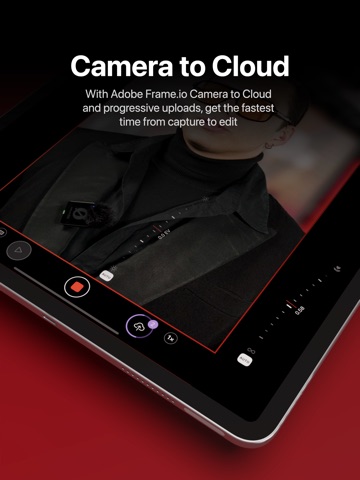
• Adobe Frame.io Camera to Cloud
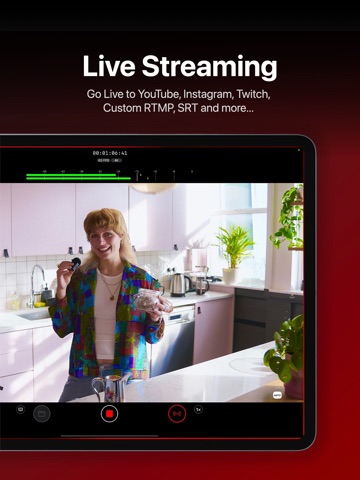
• Streaming including YouTube, Twitch, Instagram and Facebook
• Custom audio inputs
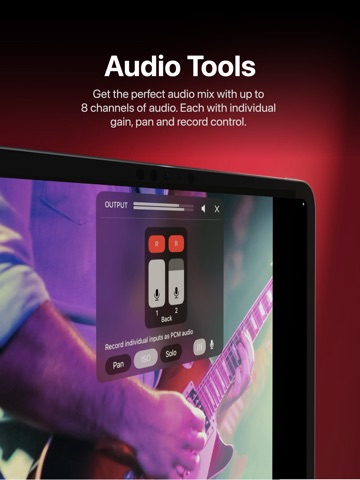
• Audio mixer including gain, pan and solo controls for individual channels
• Real-time audio passthrough for monitoring in headphones
• HDR video pipeline
• Custom RTMP destination & SRT (TX Caller) streaming
• Mavis C2C including Framelight X, MediaSilo, Sony Ci & Amazon S3
• Mavis Cloud Hub remote configuration for Mavis C2C and streaming settings
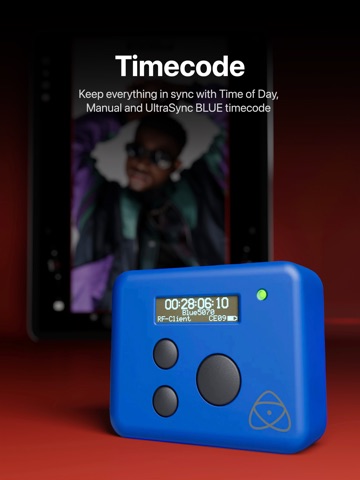
• Timecode including Time-of-Day, Offset and UltraSync BLUE
• Vertical and landscape recording and streaming
-- AUDIO TOOLS --
• Integrated audio mixer with stereo output
• Gain & pan control per input channel
• External mic inputs
• Internal mic selection
• Multi-track ISO recording
• Bluetooth monitoring
-- CONNECTED WORKFLOWS --
NDI
• Send or Receive with NDI
• NDI HX3 Certified
• Automatically find all NDI sources on local network
• Set NDI Groups, Discovery Server, UDP/TCP Mode
Camera to Cloud
• Mavis C2C integrations with Framelight X, MediaSilo, Sony Ci & Amazon S3
• Direct integration with Adobe Frame.io
• Direct integration with Atomos ATOMOSphere
• Progressive uploads while you record
• Manage Mavis C2C devices from hub.mavis.cloud
Live Streaming
• Vertical and landscape streaming
• Simultaneously record and stream
• Custom RTMP and SRT Caller destinations
• Manage Streaming devices from hub.mavis.cloud
-- CAMERA CONTROLS --
Manual controls including
• Focus
• Exposure
• ISO
• Shutter
• Color temperature
• Shutter lock
• Custom frame rates
• Range of resolutions
• Range of bitrates
• Codecs including ProRes
-- MONITOR TOOLS --
What they do
• Mavis LUTs let you record or preview your footage with a filmic grade, helping you visualise the final look while you shoot
• Focus peaking and expanded focus features help you achieve consistently sharp and precise shots
• Zebras help ensure your shots are never overexposed
• Guides help you frame your shot
• Aspect Ratio overlay lets you preview your image in a different width/height
• Waveform monitor helps you shoot with the optimal dynamic range
• Vectorscope helps maintain consistent colors and ensures accurate white balance
Notable settings
• Record and preview LUTs
• Focus peaking color and sensitivity
• Guides including thirds, portrait safe and square
• Zebras, color and sensitivity range
• Aspect Ratio overlay cross hairs, safe area and transparency
-- USER INTERFACE --
• Vertical and landscape layouts
• Designed with DSLR familiarity
• Monitor toolbar
• Internal Camera Control Wheel
• Shutter displayed in angle or speed
• Custom Function (FN) button
• Support for Camera Control
Device restrictions apply. Some features require In-App Purchase or App Subscription.
Check out the support pages for full details - support.mavis.cloud
EULA - https://www.apple.com/legal/internet-services/itunes/dev/stdeula/
Mavis Camera was developed by people who love what they do. We hope you enjoy it as much as we do! :-)
--
Mavis Camera: Pro Capture van Mavis Broadcast is een app voor iPhone, iPad en iPod touch met iOS versie 18.0 of hoger, geschikt bevonden voor gebruikers met leeftijden vanaf 4 jaar.
Informatie voor Mavis Camera: Pro Captureis het laatst vergeleken op 22 Aug om 14:02.






Informatie
- Releasedatum:16 Apr 2015
- Bijgewerkt:12 Aug 2026
- Versie:8.1.1
- Compatibiliteit:Vereist iOS 18.0 of nieuwer. Compatibel met iPhone, iPad en iPod touch.
- Grootte:249 MB
- Leeftijd:4+ jaar
- Beoordeling:4.1 van 5
- Categorie:
Nieuw in versie 8.1.1
Performance improvements and bug fixes
Prijsgeschiedenis
Recensies
Super
MeerGreat app with satisfying results! Do not underwstimate syncing with Bluetooth to film timecode with Timecode Systems Devices
5door Ron******25/05/2020Zoomfunctie
MeerIk gebruik de app nu een jaar en ben zeer tevreden over de prestaties. De app gebruik ik voornamelijk in combinatie met de externe microfoon van Shure. De MV88. De stabilisatorfunctie gebruik ik niet. Dit doe ik liever in FCP.
Ben nu ook erg blij met de zoomfunctie. Aanvankelijk lukte het mij niet om deze functie te activeren, maar intussen gaat het goed. Om die functie te activeren moet je namelijk 2 keer tikken op het scherm. Dit moet echter zeer snel (te snel).4door Anoniem12/11/2017
Reageer op deze app
Dit vind je misschien ook leuk

Laatste reacties
- Jo zei over Word Domination: "Leuke ap enkel wel heel jammer als je een nieuwe booster wilt..."
- Marc Van Hoey zei over Belfius Mobile: "beste, iPadgebruik, na laatste update, app. belfius mobile,..."
- Sanne zei over GoWish: "Ik heb deze eerst gebruikt, maar toch wel erg Amerikaans.. Ik..."
- Frederik Visser zei over Tekst naar spraak - Talkie: "Ik ben op zoek naar ervaringen van gebruikers van de pro..."
- Frederik Visser zei over Tekst naar spraak - Talkie: "Ik ben op zoek naar ervaringen van gebruikers van de pro..."
- Mario van Gool zei over Vue NL: "1 groot drama. Account van mijn zoon niet meer in te loggen...."
- Thijs zei over Burgernet: "Bij het openen van de app komt het bericht ""Er is iets..."
- Barry zei over Klaverjas: "Ik speel met vrienden tegenwoordig op de app ‘Klaverjas..."
- Catharina zei over DVHN - Nieuws & Digitale Krant: "Ik mis het nieuwswoord. Kunnen jullie dit weer toevoegen? Het..."