
LET OP: Downloads verlopen via de App Store, bekijk daar altijd de meest actuele prijs, compatibiliteit en andere informatie. Je hebt een actief Apple account nodig om apps te installeren.
Tired of the Photos app falling short? HashPhotos gives you real control over your photo library — the way it should have always worked.
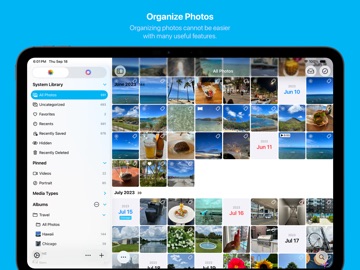
Organize your memories the way you want. Find any photo in seconds. Clean up your library with ease. All with a rich set of tools for photos and videos, built right in.
HashPhotos works seamlessly with your iOS photo library, and also includes a Local Library for photos you want to keep completely private.
Your privacy is our priority. HashPhotos never transmits your photos or personal data to external servers. Everything stays on your device.
◆ Organize
· Keywords (tags), searchable in Apple Photos as well
· Smart Album
· Uncategorized Album (See photos not in an album)
· Tray, Album Bar, Album Picker
· Add To Album (with quick access to Pinned and Recents)
· 5-Star Rating
◆ Clean Up
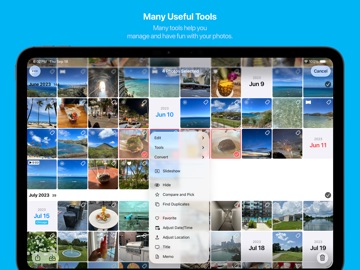
· Find Duplicates
· Find Similar Photos
· Compare and Pick
◆ Navigate & Search
· Search by keywords, built-in filters (format, size, title, filename, caption, location, and more), date/period, and dimensions
· Timeline and Events
· Map View
· Calendar
· Customizable sidebar with pin album support
· Album picker with grid view
◆ Viewer
· Photo and Video Information
· Metadata Viewer
· Histogram
· Animated Image (GIF, PNG, WebP, HEICS, AVIF)
· Live Text and Cut-out Object
· Memo
◆ Customization
· Thumbnails: sort (by date, size, filename, duration, rating, shuffle), grouping, layout styles (grid, mosaic, natural, waterfall), size, spacing, badges, additional info
· Viewer: UI visibility controls, video/Live Photo playback options, customizable gesture actions, and more
· Per-album view options, sidebar, and more
◆ Import & Export
· Import files and folders
· Export albums or folders
· Send to / receive from Mac or PC via Wi-Fi
· Save to Files (including Live Photos)
· System share integration
◆ Security & Privacy
· Local Library (Local / Private Album)
· Passcode and Face ID
· Fake Passcode for unlocking Private Album
· Privacy Options
◆ Photo Editor
· Crop, Rotate, Flip, Angle
· Adjustments and Filters (60+)
· Image / Text Overlay, Drawing, Stickers
· Blur, Tilt Shift, Shape Mask
· Eraser (Remove Background)
· Frame
◆ Video Editor
· Trim, Flip, Rotate
· Filter and Adjustments
◆ Tools
· Convert: image format, video/Live Photo to animated image (GIF, PNG, WebP), Live Photo to video or still image
· Batch Edit: apply filter, resize, rotate, flip, invert color
· Properties: adjust date/time, location, title, memo, favorite
· Metadata: edit, remove, import IPTC Keywords
· Utilities: combine photos, create animated GIF, slideshow, extract video frame, hide faces, show photos nearby
◆ Embedded Camera
· Save photos directly into an album
· Take photos with a filter
See more at https://hashphotos.app
Terms of Use: https://www.apple.com/legal/internet-services/itunes/dev/stdeula/
--
HashPhotos van beyondf is een app voor iPhone, iPad en iPod touch met iOS versie 15.5 of hoger, geschikt bevonden voor gebruikers met leeftijden vanaf 4 jaar.
Informatie voor HashPhotosis het laatst vergeleken op 17 Sep om 03:44.





Informatie
- Releasedatum:16 Dec 2013
- Bijgewerkt:23 Aug 2026
- Versie:6.5.1
- Compatibiliteit:Vereist iOS 15.5 of nieuwer. Compatibel met iPhone, iPad en iPod touch.
- Grootte:89.9 MB
- Leeftijd:4+ jaar
- Beoordeling:4.4 van 5
- Categorie:
Nieuw in versie 6.5.1
HashPhotos keeps getting better and better!
· Improved Crop tool in Editor
- Merged Rotate and Flip into a single menu
- Added Skew feature
- Tap crop result dimensions to input exact values manually
· Improved Combine Photos (iOS 17 or later)
- Added 2:3 and 3:2 output ratios
- Added two-finger rotate gesture to rotate rows/columns
· Improved Thumbnail Info to allow selecting multiple info items with a time format setting
· Improved Location Paste
- Supports pasting places/locations copied from Apple Maps
- Added Paste option to ... menu in Info Summary for photos without location data (no need to open Adjust Location)
· Improved External Library
- Improved browsing stability
- Improved video playback performance in SMB folders
- Added option to show hidden and dot-prefixed items (hidden by default)
· Improved Calendar View (right sidebar) landscape UI and fixed freeze issue during scrolling (iOS 17 or later)
· Improved Video Control to show current position and remaining time while dragging the progress bar
· Improved Screen Recording videos to remain in the Screen Recordings album after being saved with Compress Video
· Improved list refresh performance in Uncategorized album after adding to album (reduced lag)
· Added Watermark option in Camera to apply Watermark preset directly when capturing
· Added Mosaic option to Blur style in Editor Add Blur
· Added rectangle shape support to Hide Faces (previously circle only)
· Added #screenrecording built-in search filter to find Screen Recording videos
· Fixed an issue where Camera did not properly handle landscape mode when iOS orientation lock was enabled
· Fixed an issue where some videos failed to import in Local Library
· Improved stability
· Minor bug fixes
See more details here
https://hashphotos.app/releasenotes
Prijsgeschiedenis
12 geschreven reviewsRecensies
Basics good, so-called “editing” sucks
MeerIt pretty good at what it’s supposed to do, but the additional functionality sucks.
The editor doesn’t work. You can edit images all you like but the result isn’t saved. So that’s totally useless.
Tried the eraser. It erases but the result isn’t saved.
Why do you add things that don’t work?
And why do I have to manually sync?
Why doesn’t it sync automatically?2door Eri*******02/01/2026Mooie app
MeerMooie app maar irritant dat bewerkt filmpje niet hersteld kan worden naar originele staat zoals in de Foto app.
3door Jan******17/02/2025Nederlandse Taal
MeerJammer, fijne app, maar niet in het Nederlands. Waarom niet…? Te moeilijk zeker.
3door B *******25/01/2025
Reageer op deze app
Dit vind je misschien ook leuk

Laatste reacties
- Ro Rare zei over myOpel: "LoL dat een company als Opel zo'n slecht functionerende..."
- Jo zei over Word Domination: "Leuke ap enkel wel heel jammer als je een nieuwe booster wilt..."
- Marc Van Hoey zei over Belfius Mobile: "beste, iPadgebruik, na laatste update, app. belfius mobile,..."
- Sanne zei over GoWish: "Ik heb deze eerst gebruikt, maar toch wel erg Amerikaans.. Ik..."
- Frederik Visser zei over Talkie: Tekst naar Spraak: "Ik ben op zoek naar ervaringen van gebruikers van de pro..."
- Frederik Visser zei over Talkie: Tekst naar Spraak: "Ik ben op zoek naar ervaringen van gebruikers van de pro..."
- Mario van Gool zei over Vue NL: "1 groot drama. Account van mijn zoon niet meer in te loggen...."
- Thijs zei over Burgernet: "Bij het openen van de app komt het bericht ""Er is iets..."
- Barry zei over Klaverjas: "Ik speel met vrienden tegenwoordig op de app ‘Klaverjas..."