Textastic Code Editor
Alexander BlachLET OP: Downloads verlopen via de App Store, bekijk daar altijd de meest actuele prijs, compatibiliteit en andere informatie. Je hebt een actief Apple account nodig om apps te installeren.
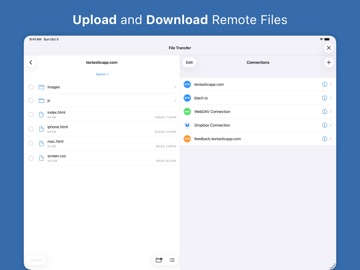
Textastic is a comprehensive and versatile text and code editor for iPad and iPhone. It supports syntax highlighting of more than 80 programming and markup languages. Connect to SFTP, FTP, and WebDAV servers or to your Dropbox account. Use the built-in SSH terminal to work directly on your server.
FEATURES:
• Syntax highlighting of more than 80 languages: HTML, JavaScript, CSS, C++, Swift, Objective-C, Rust, XML, Markdown, PHP, Perl, Python, Ruby, Lua, YAML, JSON, SQL, shell scripts, and many more (full list available on the website)
• Compatible with Sublime Text 3 and TextMate 1 syntax definitions and themes
• Code completion for HTML, CSS, JavaScript, C, Objective-C, and PHP
• SFTP (SSH connection), FTP, FTPS (FTP over SSL), WebDAV and Dropbox clients
• SSH terminal connections
• Code formatter for HTML, CSS, JavaScript, and JSON
• Git repositories from the Git client app Working Copy can be opened as external folders in Textastic
• Emmet support
• JavaScript console
• iCloud Drive file synchronization
• WebDAV server to easily transfer files from your Mac or PC over Wi-Fi.
• Symbol list to quickly navigate in a file
• Full support for external keyboards, trackpads, and mice
• Configurable keyboard shortcuts
• Displays additional keys over the virtual keyboard to make it easy to type characters often used for programming
• Cursor navigation wheel for easy text selection
• Easily move the cursor using swipe gestures
• Split View and Slide Over multitasking on iPad
• Open multiple files in tabs
• Multiple Windows on iPadOS
• Support for Dark Mode
• Supports most encodings like UTF-8, UTF-16, and ISO-8859-1
• Supports different tab widths and soft tabs (spaces instead of tabs)
• Custom fonts
• Find & Replace (including regular expression search)
• Find in multiple files
• File information like character count and word count
• Local and remote web preview for HTML and Markdown files
To unlock all features, activate Textastic Pro through a yearly or monthly subscription (includes a 7-day FREE trial) or with a one-time purchase.
Privacy Policy: https://www.textasticapp.com/privacy.html
Terms of Use: https://www.apple.com/legal/internet-services/itunes/dev/stdeula/
--
Textastic Code Editor van Alexander Blach is een app voor iPhone, iPad en iPod touch met iOS versie 16.0 of hoger, geschikt bevonden voor gebruikers met leeftijden vanaf 4 jaar.
Informatie voor Textastic Code Editoris het laatst vergeleken op 4 Feb om 01:46.
Informatie
- Releasedatum:12 Mar 2016
- Bijgewerkt:20 Jan 2026
- Versie:10.9
- Compatibiliteit:Vereist iOS 16.0 of nieuwer. Compatibel met iPhone, iPad en iPod touch.
- Grootte:24.7 MB
- Leeftijd:4+ jaar
- Beoordeling:4.6 van 5
- Categorie:
Nieuw in versie 10.9
New: Export and Import Remote Connections
You can now export (S)FTP and WebDAV connections to a JSON file, then import them on another device or keep them as a backup.
This can be used to:
- Move connections between devices (for example, from iPhone to iPad)
- Create backups of your connection settings
- Share connection setups with your team
- Edit or create connection files manually if needed
You can find more details in the manual under “Remote Connections” > “Exporting and Importing Remote Connections”:
https://www.textasticapp.com/v10/manual/remote_servers/export_import.html
Other Changes:
- Removed the Google Drive client, as previously announced
- File > Save (Cmd-S) now always saves the currently open file, even if it was not modified
Prijsgeschiedenis
9 geschreven reviewsRecensies
Where is PgUp/PgDn?
MeerThis is in my experience the best text editor on the iPad, however it lacks a few features that prevents it from being more than something almost usable.
- All the iPad keyboards I have ever seen lacks dedicated PgUp/Dn keys, so you need to emulate it with arrow + modifier. Without theese two, scroll keys, or at least the vim shortcuts (also not suppported) login in to a remote server and using vim/emacs is just more practical. I am somewhat curious why this wasnt implemented in version 1 or 2, since it is a pretty obvious and major shortcomming, for anybody trying to actually use this.
- Many BT keyboards ends up giving you § and ± instead of tilde and backtick. Adding a remapping feature where you can enter a key and (important) FREELY select what that character should send, would be a huge improvement!4door Ipr*******17/03/2024Very good for pro and beginners.
MeerI use this app for many years. For minor changes on websites of customers when on the road.
For try out new things when out off office.
For teaching young people to code html css and javascript.
Amazing stable app.5door I P*******18/06/2022Find Next keyboard shortcut
MeerHow the hell can this editor not have a keyboard shortcut for “Find Next” ?
This is so basic…4door Ind***23/10/2021
Reageer op deze app
Recent bekeken
Dit vind je misschien ook leuk
Laatste reacties
- Pieter Nieuwenhuis zei over Klaverjas HD: "Wij spelen regelmatig met 4 vrienden, verdeeld over Europa...."
- Bep vreeswijk zei over Oei, ik groei!: "Jammer,ik speelde het jaren lang voor koopprijs,eenmalig,was..."
- Bep vreeswijk zei over Oei, ik groei!: "Ik kocht het spel,was duur in vergelijking tot anderen en zou..."
- EBB zei over QuizzLand Algemene Kennis Quiz: "Terwijl ik midden in het spel zat en klikte was er plotseling..."
- Mary zei over Klaverjas: "Kan je met vrienden spelen of alleen maar met de computer?"
- Allard Postmus zei over WordOn HD: "Ik heb een probleem met Wordon wat betreft de totaal stand Ik..."
- Leo zei over Vita Mahjong: "Na de update is het spel veranderd en niet ten goede. Ook had..."
- Dion zei over Bonnetje: "Teleurstellende ervaring, onduidelijke communicatie en..."
- Bert Maas zei over PaperCal: "Gebruik papercal al jaren tot volle tevredenheid, maar opeens..."