
LET OP: Aankopen verlopen via de App Store, controleer daar altijd de meest actuele prijs, compatibiliteit en andere informatie. Je hebt een actief Apple account nodig om apps te installeren.
PDF Max Pro is a complete PDF editor for iPhone, iPad, and Mac, trusted by millions of people since 2012.
From signing a form to building research you can verify, PDF Max Pro helps you edit, annotate, organize, understand, study, protect, and deliver PDFs—all in one app.
YOUR PDF. NOW A WORKSPACE.
Collect important passages, highlights, images, tables, formulas, and notes as Cards beside your PDFs. Every Card remembers where it came from, so you can return to the original page whenever you need the full context.
• Search, tag, connect, and arrange your Cards
• Gather related Cards into named groups called Frames
• Organize evidence from several PDFs without merging them
• Compare passages side by side or view your evidence as an Outline or table
• Present Frames or export your work to Markdown, PDF, or Word
STUDY WHAT MATTERS
Turn trusted Cards into Questions, practice a focused topic, or use scheduled Study for long-term review. Track your Progress, study text and visual material, and return to the supporting PDF whenever an answer needs more context.
On supported devices, Apple Intelligence can draft Questions for you to review before saving.
EDIT, ANNOTATE, FILL, AND SIGN
• Edit existing text, typography, images, links, shapes, and tables
• Add, replace, crop, align, rotate, and arrange content
• Remove image backgrounds and automatically crop subjects
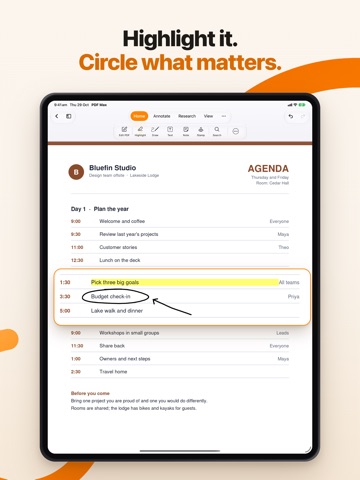
• Highlight, underline, strike through, draw, stamp, and comment
• Add text boxes, callouts, notes, shapes, and threaded comments
• Complete forms, find missing required fields, and add reusable signatures
• Create and edit text, checkbox, radio, dropdown, signature, date, and image fields
• Permanently redact text, areas, pages, or search results
SCAN, READ, AND UNDERSTAND
• Scan paper with automatic capture, edge detection, cleanup, crop, filters, and page reordering
• Make scans searchable with optional OCR
• Turn selected images into polished PDFs
• Reflow fixed or scanned pages into a comfortable reading column
• Keep figures beside the text they explain
• Customize reading theme, typography, spacing, margins, and alignment
• Translate supported languages and listen with on-device Read Aloud
• Keep selected passages and useful context with Focus View
VOICE NOTES THAT STAY ON THE PAGE
• Place and play audio notes anywhere in a PDF
• Create searchable on-device transcripts when the required speech model is available
MAKE FLAT FORMS FILLABLE
• Detect likely text, checkbox, and signature fields in flat or printed forms
• Review every detected field before applying it
• Use Form Assist to review suggested answers from your encrypted profile
EVERY PDF TOOL IN ONE PLACE
• Reorder, rotate, insert, duplicate, replace, extract, merge, split, or delete pages
• Compress PDFs while preserving selectable text and vector graphics
• Resize mixed pages to standard paper sizes
• Add page numbers, N of M, Roman numerals, letters, or Bates numbering
• Add or remove an open password
• Create and edit PDF outlines and bookmarks
• Recognize text with OCR and convert Word documents to PDF
• Create PDFs from paper, journal, planner, graph, and project templates
• Present PDF pages or Workspace Frames full screen
• Save, print, flatten, share, or export the finished result
Join more than 25 million downloads worldwide and move from document to outcome with PDF Max Pro.
Some advanced features require PDF Max PREMIUM.
PDF MAX PREMIUM SUBSCRIPTION
Payment will be charged to your Apple Account when the purchase is confirmed. Subscriptions renew automatically unless canceled at least 24 hours before the end of the current subscription period. You can manage or cancel your subscription in your Apple Account settings. Any unused portion of a free trial will be forfeited when a subscription is purchased, where applicable.
Privacy Policy: https://mobeera.ai/privacy
Terms: https://mobeera.ai/terms
--
PDF Max Pro - Edit, Sign PDFs van Mobeera is een app voor iPhone, iPad en iPod touch met iOS versie 18.0 of hoger, geschikt bevonden voor gebruikers met leeftijden vanaf 4 jaar.
Informatie voor PDF Max Pro - Edit, Sign PDFsis het laatst vergeleken op 1 Nov om 22:03.




Informatie
- Releasedatum:11 Sep 2012
- Bijgewerkt:30 Oct 2026
- Versie:27.6
- Compatibiliteit:Vereist iOS 18.0 of nieuwer. Compatibel met iPhone, iPad en iPod touch.
- Grootte:315 MB
- Leeftijd:4+ jaar
- Beoordeling:4.1 van 5
- Categorie:
Nieuw in versie 27.6
Sharper, faster pages, and every tool in one row.
• Sharp at every zoom: text and markup stay crisp while you zoom and scroll, with no blurry pass.
• Smoother pages: a new PDF engine scrolls and zooms with far fewer dropped frames, even in long documents.
• One-row ribbon: on iPhone and iPad the ribbon fits in a single row, leaving more room for your page. Groups that don't fit move into More instead of being cut off, and Cut and Copy sit beside Paste.
• Made for every iPhone, including the iPhone Duo cover screen: the ink, stamp and signature galleries fit the row.
• A cleaner look: lighter icons, and menus that open on whichever side has room.
• Print-ready PDFs: fonts embedded in the PDFs you save now pass the checks print services run.
• No more growing files: saving a PDF you didn't change no longer makes it bigger.
• On iPhone, tapping a page in Edit PDF opens that page for editing.
• Last Used zoom remembers Fit Width or Fit Page, and documents open faster.
• Safer saving: closing a document while a sheet is open saves it first, a PDF you just saved no longer asks again, and moved pages keep their order.
• Selection, search and markup follow the text on more PDFs, plus many other fixes.
Prijsgeschiedenis
7 geschreven reviewsRecensies
Is development stopped?
MeerIt's 2 years ago since last update. This app does not realy support iPhone X and not iOS 11.
2door Bal****16/07/2018The best PDF.app
MeerI have been using PDF Max 5 Pro for years, and I stil love it. For me the best PDF.app for ever.
5door Rai****05/11/2016Zou nog beter kunnen.
MeerVind het een fijne app, maar kan nog beter, vond het fijn dat ik door een woord te selecteren op Wikipedia de betekenis kon opzoeken, maar dat is na een update ineens weg.
Vind het jammer dat ik het vakje waarin je notities toe kan voegen niet breder kan maken door er aan te slepen en dat ik het vakje niet kan verslepen naar een andere plek in de pagina. zoals dat wel kan bij PDF notes.
Maar verder vind ik het een hele fijne app.
Ben blij dat ik hem aangeschaft heb.
Vind het symbooltje voor de notitie een beetje erg groot, zou van mij iets kleiner mogen.4door Zon*******12/12/2015
Meer van Mobeera

Reageer op deze app
Dit vind je misschien ook leuk
Laatste reacties
- Enzo Costa zei over Endless Numbers: "Enzo Miguel Costa Torres Ramos"
- Frankie Volckerick zei over Foto Bewerken - Perfect Image: "Kan er mij iemand helpen ? Ik gebruik al jaren de app maar nu..."
- Sanne zei over Enigmic: Misdaadpuzzels: "Leuk spel! Zelf ik ben helemaal fan van dit genre en bekijk..."
- Peter zei over Wizard for Wordfeud: "Just for your info, but since the upgrade to IOS 27.2. From..."
- Jolanda Smit zei over pym. Je fotoboek, al klaar: "Sinds 2013 al een gebruiker en sindsdien (zo goed als) elke..."
- Ludo zei over HERE WeGo Kaarten & Navigatie: "Op de iPhone is HereWeGo een goede navigatie app, echter met..."
- Soundmaster zei over UNDOK: "UNDOK werkt niet meer na installatie iOS27! Alle richtlijnen..."
- Ryan zei over James-Horeca: "Zeer teleurstellende ervaring Helaas heb ik een erg negatieve..."
- Ro Rare zei over myOpel: "LoL dat een company als Opel zo'n slecht functionerende..."