Occasions: Wedding Planner
Createful Ltd
LET OP: Downloads verlopen via de App Store, bekijk daar altijd de meest actuele prijs, compatibiliteit en andere informatie. Je hebt een actief Apple account nodig om apps te installeren.
Everything you are planning, in one place: who is coming, where they are sitting, what it costs, who you are paying, and what happens when. On your iPhone and iPad, from the engagement to the thank-you cards.
THE OVERVIEW
Open the app and the day is there. How long you have, how many have replied, what the budget is doing, which suppliers are still owed. Every number comes from your plan, and anything overdue rises to the top on its own.
THE GUEST LIST
Invite people to the whole day or just the evening, track who has replied, and keep plus-ones attached to the person who brought them. Headcounts update themselves as replies come in, so the number you give the caterer is the number you actually have. Dietary and access needs sit on the guest, not in a note somewhere else.
SEATING
Lay the room out with the tables you actually have: round, long, a top table, a cake table, a dance floor. Drag guests into seats while the app counts who is still standing, and it flags a seat held by somebody who has since declined. Print it or send a PDF when the venue asks.
MONEY
Set what you expect to spend by category, and the app fills in what you have committed from the suppliers you have booked. Categories cannot out-promise the budget, and going over is reported rather than rewritten.
THE RUNNING ORDER
Hair at eight, photographer at ten, cars at half past one. Build the order for the day itself, and separate ones for the rehearsal and the morning after. The gaps show between the entries, because the free forty-five minutes matters as much as the things either side of it.
SUPPLIERS
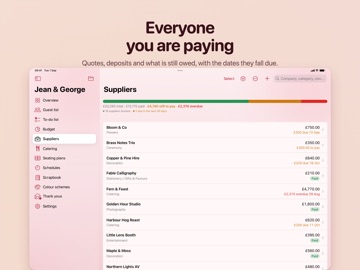
The venue, the florist, the photographer, the band. Contacts, quotes, what is agreed and what is still owed. Each supplier is filed under a budget category, so booking one updates the budget without you telling it twice. Deposits carry dates, so money due next month is visible this month.
TO-DOS
A new plan arrives with a wedding checklist already in it: the things everybody has to do, roughly when they are usually done. Take what you want, ignore the rest, and share the tasks out.
SCRAPBOOK
A wall you pin things to: photographs, a link to the venue you liked, a voice note from the florist. Keep several boards, one per thing still undecided.
ON THE HOME SCREEN
Three widgets in every size, plus Lock Screen countdowns and Control Centre buttons. Tick a task off from the Home Screen and it is done in the app. On the day itself a Live Activity holds the running order on the Lock Screen, with a button to move things on when something runs late.
NO ASSUMPTIONS
A new plan asks for partner one and partner two. If that is not what you call yourselves, set it to bride and groom, bride and bride, or groom and groom, and the app uses your words.
ALSO IN THERE
Catering by course. Colour palettes lifted from a photograph. Thank-you tracking. Spreadsheet import and PDF export. Fifteen accent themes and six app icons. A finished wedding is archived in full rather than deleted.
SYNC AND SHARING
With a subscription your wedding syncs through your own iCloud, so every device shows the same guest list and balance owing. Then share it with the person you are marrying. They open it on their own Apple Account and are in the same wedding, not a copy: they tick a task off and it is ticked for you. They do not need a subscription of their own.
PRIVACY
It all goes through Apple. No account to create with us, and no copy of your guest list on a server we control.
WHAT IT COSTS
Free to use for one wedding, with up to twenty-five items in each list. A subscription lifts the limits and adds sync and sharing, and covers Occasion Plans: Events too.
Personal covers one wedding, Planner up to ten, and Unlimited as many as you need. Each is sold monthly or yearly and starts with one month free. Personal Forever is a single payment for one wedding and does not renew.
Terms of Use: https://www.occasionplans.com/terms
Privacy Policy: https://www.occasionplans.com/privacy
--
Occasions: Wedding Planner van Createful Ltd is een app voor iPhone, iPad en iPod touch met iOS versie 18.0 of hoger, geschikt bevonden voor gebruikers met leeftijden vanaf 4 jaar.
Informatie voor Occasions: Wedding Planneris het laatst vergeleken op 24 Sep om 11:45.




Informatie
- Releasedatum:6 Jan 2012
- Bijgewerkt:7 Sep 2026
- Versie:2.0.1
- Compatibiliteit:Vereist iOS 18.0 of nieuwer. Compatibel met iPhone, iPad en iPod touch.
- Grootte:62.9 MB
- Leeftijd:4+ jaar
- Beoordeling:3 van 5
- Categorie:
Nieuw in versie 2.0.1
Seating plans now work with VoiceOver. Every table, chair and dance floor is read out with who is sitting where, and tables can be edited, copied and removed without needing to hit a small target. If you use VoiceOver, the seating plan is now a room you can move people around in rather than a blank rectangle.
Tables seat up to 16. Changing a table's shape no longer turns anyone out of their seat.
A wedding somebody shared with you no longer counts against your own plan allowance. Your plans are yours; theirs are theirs.
Dates written the short way, like 24 Aug 27, now import as the right year.
If the app cannot save a change, it says so instead of quietly losing it.
Prijsgeschiedenis
Recensie
Superapp!
MeerHeel handig voor het plannen van een bruiloft. Voor de weddingplanner om alles paraat te hebben op de dag zelf. Deze app is zijn geld waard!
5door Dr.****06/01/2014
Meer van Createful Ltd

Reageer op deze app
Dit vind je misschien ook leuk
Laatste reacties
- Adnan Ali zei over Pindat - Reisblog maken: "Поринути у світ захоплюючих подорожей, відкривати приховані..."
- plinko clicker game zei over Radio 10: "Is there actually any point to this app when you can just..."
- random number generator phone zei over Radio 10: "Ik zag dat de AppWereld-site de app niet meer heeft, klinkt..."
- Ro Rare zei over myOpel: "LoL dat een company als Opel zo'n slecht functionerende..."
- Jo zei over Word Domination: "Leuke ap enkel wel heel jammer als je een nieuwe booster wilt..."
- Marc Van Hoey zei over Belfius Mobile: "beste, iPadgebruik, na laatste update, app. belfius mobile,..."
- Sanne zei over GoWish: "Ik heb deze eerst gebruikt, maar toch wel erg Amerikaans.. Ik..."
- Frederik Visser zei over Talkie: Tekst naar Spraak: "Ik ben op zoek naar ervaringen van gebruikers van de pro..."
- Frederik Visser zei over Talkie: Tekst naar Spraak: "Ik ben op zoek naar ervaringen van gebruikers van de pro..."