
LET OP: Aankopen verlopen via de App Store, bekijk daar altijd de meest actuele prijs, compatibiliteit en andere informatie. Je hebt een actief Apple account nodig om apps te installeren.
Download, listen, watch, and relish your favorite podcasts.
FEATURES
- Subscribe to your preferred podcasts within the app and manage them conveniently.
- Download episodes over WiFi or Cellular (available on devices with cellular capabilities).
- Support for password-protected feeds.
- Background refresh and download in the background.
- Sync subscriptions, episode playback positions, and playlists between your devices using iCloud.
- Universal App (compatible with iPhone and iPad).
- Search across all views to locate the podcast or episode you’re seeking.
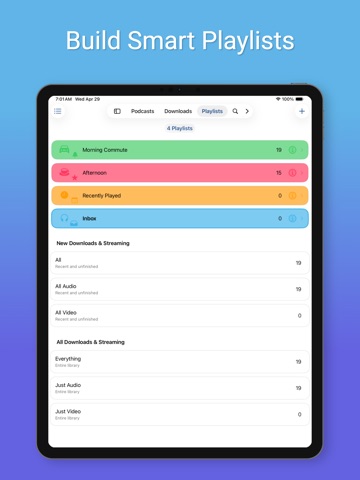
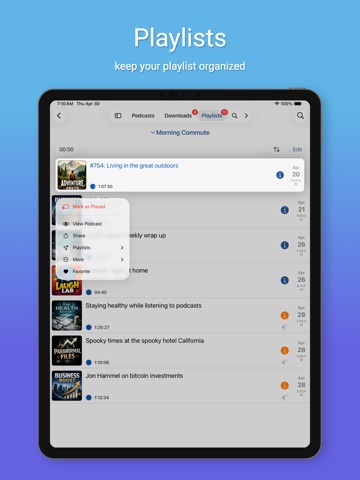
- Customize playlists with filtering options based on podcasts, episodes, and more.
- Support for continuous playback (toggle it on the now playing screen just below the time elapsed).
- Portrait and landscape orientation supporter, with a configurable option in the settings.
- Unfollow podcasts and still keep them on your device. This feature is particularly useful for podcasts that don’t meet your expectations.
PLAYBACK
- Variable playback speed.
- Remembered playback speed per podcast.
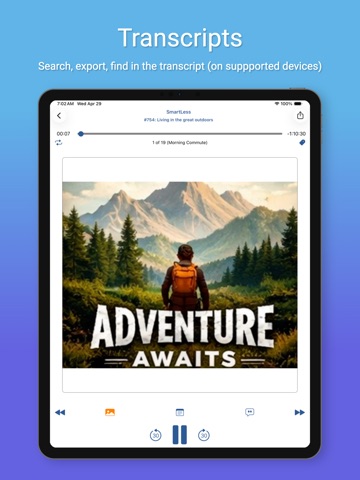
- Support for podcasts with chapters and chapter images (MP3 and M4A formats).
- Utilize your headset controls, including Bluetooth car controls (when paired), to play/pause, jump forward or backward 30 seconds.
- Sleep timer.
- Beautifully rendered show notes.
- Onscreen controls for skipping ahead and skipping back.
- Gesture support on the now playing screen (when the podcast logo is visible) to facilitate hands-free use.
- Double-tap to play/pause.
- Swipe up to adjust playback speed.
- Swipe left or right to rewind or fast-forward.
- Home to the L gesture for the 2-minute Leo jump.
- Refer to Settings and Gestures for more information and customization options for rewind/fast-forward gestures.
- AirPlay support allows you to watch or listen to podcasts on your large screen.
- External display support for videos is available for devices that support an external display (use the Apple HDMI adapter).
- Enjoy your favorite podcasts with a familiar layout.
FIND NEW PODCASTS QUICKLY
- Search for your podcasts by title, keyword, or author.
- Browse the top podcasts categorized by different genres.
• Manually add podcasts by entering their URLs.
• Support for password-protected feeds.
• Option to download a single episode.
• Import podcast subscriptions for episodes already on your device from iTunes.
• Import your OPML file from iTunes or other iOS podcast app.
• Import media using the iTunes File Sharing feature.
• Add your existing audiobooks (non-password-protected ones) using the iTunes File Sharing feature.
• Add previously downloaded podcasts from your computer using the iTunes file sharing feature (see Settings and Import Media for details).
SHORTCUT ACTIONS
• Search your podcasts and episodes using shortcut actions.
• Easily create an export from other apps into iCatcher using the subscribe action.
• Control playback.
• View podcast action including currently playing.
• Import media directly into the app (like audiobooks).
• Transfer your media to the watch via shortcut actions.
• Pull chapter images.
• Many more actions available.
MORE
• Completely customizable to suit your podcast preferences.
• Swipe across a podcast or episode to access additional options.
• Podcast settings allow you to set the days the podcast typically releases or the number of days between.
• Specify the number of episodes to download when new ones are available.
• Share podcast information via email with your friends.
CONTACT
Email: Tap the settings tab and select Send Questions or Feedback.
Twitter/X: @Joeisanerd.
PLEASE NOTE: The app doesn’t sync with iTunes. Like other podcast apps, it’s a standalone app designed for subscribing and downloading on the device.
* If a feed doesn’t work, please let me know so I can investigate it.
Requires iOS 18.5
--
iCatcher! Podcast App van Joeisanerd.com is een app voor iPhone, iPad en iPod touch met iOS versie 18.5 of hoger, geschikt bevonden voor gebruikers met leeftijden vanaf 12 jaar.
Informatie voor iCatcher! Podcast Appis het laatst vergeleken op 31 Oct om 04:16.


Informatie
- Releasedatum:15 Mar 2011
- Bijgewerkt:29 Oct 2026
- Versie:15.2.2
- Compatibiliteit:Vereist iOS 18.5 of nieuwer. Compatibel met iPhone, iPad en iPod touch.
- Grootte:77.7 MB
- Leeftijd:12+ jaar
- Beoordeling:4.9 van 5
- Categorie:
Soms/Mild grof taalgebruik of grove humor;
Soms/Milde medische/behandelingsinformatie;
Soms/Mild alcohol-, tabaks- of drugsgebruik of referenties ernaar;
Soms/Milde horror-/angstthema’s;
Soms/Mild animatiegeweld of fictief geweld;
Soms/Milde volwassen/suggestieve thema’s.
Nieuw in versie 15.2.2
If you find iCatcher useful, please consider tipping in the help and settings tab, or share the app with your friends! Thanks!
Bug fixes
-Fixed playback jumping to an episode from Downloaded, instead of the next episode of the podcast you started from, when the sleep timer paused playback and iCatcher was relaunched before you resumed.
-Fixed VoiceOver in grid view on the podcasts tab.
-Fixed play/pause controls showing the wrong state when starting or resuming playback.
15.2.1 Updates
What’s New
+Added adjustable audio normalization boost levels that make quiet spoken audio louder while protecting loud peaks.
+Added a count beneath each Podcast Defaults setting showing how many podcasts use a custom value. Tap it to see those podcasts and set them back to the default one at a time, in a selection, or all at once.
+Improved the layout of the Now Playing screen for foldable iPhones and other wide windows.
+Added a prompt when you start a different episode while another is partly played and [Up Next] has episodes. Choose to play it now, play it and resume the current episode afterward, play it next, or add it to the end of Up Next. Episodes in Up Next now also show a small icon in episode lists.
+Updated the Include Podcasts and Exclude Podcasts lists in the playlist editor: Select Visible and Clear Visible now act only on the podcasts currently shown (with a confirmation before clearing), All and Selected are now a segmented control, and podcasts you follow are marked Following. Added options to filter by follow status and to sort by title, following, or selected.
+Improved performance when refreshing podcasts.
Bug fixes
-Fixed a crash that could occur when a download failed or the server returned an error.
-Fixed excessive storage writes at startup for users with large libraries of downloaded episodes.
-Fixed high CPU and battery use in CarPlay when the Listen Now list refreshed.
-Fixed the Library icons in CarPlay showing as black instead of white.
View the Settings tab, What’s New to view past updates.
Follow me on x @joeisanerd and Mastodon joeisanerd@techhub.social
Prijsgeschiedenis
13 geschreven reviewsRecensies
Upload audiobooks to your Apple Watch!
MeerI have a huge collection of DRM-free audiobooks NOT bought in iTunes, so the audiobooks app on my Apple Watch doesn’t want to download them.
But with iCatcher, this CAN be done!
Just upload your books to (for example) iCloud and use the iPhone app to transfer to the Apple Watch.
Now, I can finally leave my heavy iPhone at home when I’m going for a walk or jog.
It even lets you play through the Watch’s internal speaker, exceeding expectations even more!
Incredible work!5door Sam*******04/09/2023Must have voor podcasts
MeerFijne podcast app met:
+ unique: Apple Shortcuts Automation support ideaal voor bluetooth verbinding
+ veel filter opties
+ makkelijk toegang tot downloads en verwijderd automatisch wanneer beluisterd
+ betrouwbaar, geregeld updates
+ Betaal één keer, geen abonnement of advertenties
+ voor wie het heeft: CarPlay en AppleWatch support
Minpunten:
- UI kan wat gelikter
- Mist Chromecast ondersteuning4door Pac****15/06/2022Best podcast app out there
MeerI don’t understand how this isn’t the most popular podcast app around. It’s easy to use, very well organised. Playlist function is top notch. You can have a list of podcast you don’t subscribe to but occasionally like to listen to. Syncing cross devices is no trouble at all. 10/10
5door Sim****15/08/2021
Reageer op deze app
Dit vind je misschien ook leuk

Laatste reacties
- Enzo Costa zei over Endless Numbers: "Enzo Miguel Costa Torres Ramos"
- Frankie Volckerick zei over Foto Bewerken - Perfect Image: "Kan er mij iemand helpen ? Ik gebruik al jaren de app maar nu..."
- Sanne zei over Enigmic: Misdaadpuzzels: "Leuk spel! Zelf ik ben helemaal fan van dit genre en bekijk..."
- Peter zei over Wizard for Wordfeud: "Just for your info, but since the upgrade to IOS 27.2. From..."
- Jolanda Smit zei over pym. Je fotoboek, al klaar: "Sinds 2013 al een gebruiker en sindsdien (zo goed als) elke..."
- Ludo zei over HERE WeGo Kaarten & Navigatie: "Op de iPhone is HereWeGo een goede navigatie app, echter met..."
- Soundmaster zei over UNDOK: "UNDOK werkt niet meer na installatie iOS27! Alle richtlijnen..."
- Ryan zei over James-Horeca: "Zeer teleurstellende ervaring Helaas heb ik een erg negatieve..."
- Ro Rare zei over myOpel: "LoL dat een company als Opel zo'n slecht functionerende..."